A busy day can feel like a jumble of reminders, deadlines, and half-finished projects. A task list turns that jumble into something you can see and act on. And you don’t need a paid app or a complicated productivity system to get started: a free template can give you a ready-made structure for planning your day, week, or project.
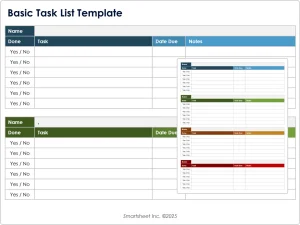 In this guide, we’ll explore the benefits of task list templates, the most useful formats, what to look for when choosing one, and how to make a template work for you.
What Is a Task List Template?
A task list template is a reusable layout for recording and managing things you need to do. Depending on its purpose, it might include fields for:
- Task or action
- Due date
- Priority
- Status
- Project or category
- Estimated time
- Notes or next steps
Templates can be as simple as a printable checklist or as detailed as a spreadsheet with filters and progress tracking. Their main advantage is that they provide a starting point, so you can spend less time designing a system and more time using it.
Why Use a Task List Template?
Make tasks easier to remember
Writing tasks down moves them out of your head and into a dependable place. A list can help you keep track of commitments and see what needs attention next. Research on prospective memory—the ability to remember to carry out future intentions—has found that making a plan can help people follow through on intended actions.[1]
Turn vague goals into clear actions
“Work on the presentation” is difficult to start. “Draft the opening slides” is more concrete. Breaking a larger goal into specific next steps makes it easier to decide what to do and when.
See priorities at a glance
A list that includes due dates or priority labels can help distinguish urgent work from tasks that can wait. This is particularly useful when everything feels important.
Create a repeatable routine
A weekly planning template, for example, can give you the same place to review deadlines, schedule work, and note follow-ups. Repeating a simple process can make planning feel less effortful over time.
Common Types of Free Task List Templates
The best template depends on what you’re organizing. Here are several common formats.
Daily task list
A daily list is designed for immediate work. It might include a date, a short list of priorities, and space for notes or unfinished tasks.
Best for: Managing a busy day, organizing a short shift, or choosing a few key tasks to focus on.
Tip: Keep the list realistic. If you routinely carry half your tasks to the next day, reduce the number of planned items or break large tasks into smaller steps.
Weekly task list
A weekly template provides a broader view of deadlines and responsibilities. Some versions divide the page into days; others group tasks by project or category.
Best for: Balancing work across the week, planning household responsibilities, or keeping track of recurring commitments.
Tip: Add fixed appointments first, then assign flexible tasks to the remaining time.
Project task list
A project list groups related actions under a shared outcome. Useful fields may include task owner, status, due date, and dependencies—steps that must be completed before other work can begin.
Best for: Team projects, event planning, home renovations, and multi-step personal goals.
Tip: Write tasks as actions, such as “Send draft to reviewer,” rather than labels like “Draft.”
Priority task list
This format helps you sort tasks by urgency or importance. You can use simple labels—high, medium, and low—or a numbered ranking.
Best for: Days when you have more work than available time.
Tip: Priority labels are most helpful when you define what they mean. For example, “high” might mean a task is due soon or blocks someone else’s work.
Printable checklist
A checklist is a straightforward way to follow a repeatable process. It can be used for packing, cleaning, opening or closing a workplace, or preparing for a recurring meeting.
Best for: Routine tasks where consistency matters.
Tip: Review the checklist occasionally. Remove steps that no longer apply and add any that are easy to forget.
Digital spreadsheet or app template
Digital templates can be sorted, shared, duplicated, and updated across devices. A spreadsheet may be enough for individual planning; a shared task-management tool may be more suitable when several people need to coordinate.
Best for: People who want searchable lists, collaboration, or multiple views of the same work.
Tip: Start with the simplest tool that meets your needs. Extra features are useful only if they make the system easier to maintain.
What to Look for in a Free Template
Before downloading or building a template, consider how you’ll use it.
- A clear layout: You should be able to understand the list quickly.
- Useful fields: Choose only the details you actually need, such as due date or status.
- Room to adapt: A good template can be adjusted for your schedule and type of work.
- The right format: Pick a printable file if you prefer pen and paper, or a digital format if you need search and sharing.
- Easy access: Make sure the template works on the device or software you use.
- Privacy and sharing controls: For work or personal information, check where the data is stored and who can access it.
Be cautious about templates that require unnecessary personal information, subscriptions, or software you don’t already use. “Free” can mean different things: a file may be free to download but require a paid app to edit, or a tool may offer a free tier with limitations. Check the terms before committing.
Where to Find Free Task List Templates
You can find free templates from several kinds of sources:
Office software libraries
Microsoft provides downloadable and built-in templates for Excel, Word, and other Microsoft 365 applications.[2] Google Docs and Sheets users can explore templates through the Google Workspace template gallery.[3] These can be convenient choices if you already use those tools.
Productivity and project-management platforms
Some task-management services offer template galleries or starter boards. These can be helpful for shared projects, but check whether collaboration, automation, or other features require a paid plan.
Design and print resources
Websites that provide printable planners may offer daily, weekly, or specialized checklists. Review the file type, printing requirements, and any restrictions on personal or commercial use.
Templates you make yourself
A basic spreadsheet or document can be a template, too. Create a few columns—such as Task, Due date, Priority, and Status—and save a blank copy to reuse. A homemade template may be a better fit than a polished design with fields you don’t need.
How to Use a Task List Template Effectively
1. Capture tasks in one place
Scattered notes can be hard to review. Choose one main list for tasks, then use separate project lists only when they make a large body of work easier to manage.
2. Make each item actionable
Begin task names with a verb where possible: “Call supplier,” “Review budget,” or “Schedule appointment.” If a task still feels intimidating, split it into smaller actions.
3. Add dates selectively
Due dates can help you plan, but assigning one to every task may make the system noisy. Add a date when there is a genuine deadline or when you need to reserve time for the work.
4. Choose priorities sparingly
If every task is marked “high,” the label stops being useful. Identify a small number of tasks that deserve your first attention, then leave the rest unranked or assign them lower priority.
5. Review and update the list
A task list is a planning tool, not a permanent record of everything you have ever considered doing. Review it regularly, mark completed work, reschedule valid tasks, and remove items that are no longer relevant.
6. Keep the system lightweight
The purpose of a template is to reduce friction. If updating it takes too long, remove fields or switch to a simpler format. The most useful task list is one you’ll actually maintain.
A Simple Free Task List Template
You can create a basic template in a document, spreadsheet, notebook, or task app:
| Priority | Task | Due date | Status | Notes |
|---|---|---|---|---|
| High | Not started | |||
| Medium | In progress | |||
| Low | Not started |
For a daily version, add a date and a short Top priorities section. For a project version, add columns for Owner and Dependencies. Keep the structure only as detailed as your work requires.
Conclusion
Free task list templates offer a practical way to organize responsibilities without starting from scratch. Whether you prefer a printable checklist, a weekly planner, a spreadsheet, or a digital task board, the right template should make your next steps clearer—not add another system to manage.
Start with a simple format, write tasks as concrete actions, and review the list often enough to keep it useful. You can always add features later. A task list doesn’t have to be elaborate to help you make steady progress.
Sources
- McDaniel, M. A., & Einstein, G. O. “Strategic and Automatic Processes in Prospective Memory Retrieval: A Multiprocess Framework.” Applied Cognitive Psychology, 2000. https://doi.org/10.1002/1099-0720(200011/12)14:7%3C127::AID-ACP696%3E3.0.CO;2-T
- Microsoft Create, templates for Microsoft 365. https://create.microsoft.com/
- Google Workspace Learning Center, templates in Google Docs and Sheets. https://support.google.com/a/users/answer/9308885