A visitor arrives for an important meeting, but nobody knows who they’re seeing. The receptionist has to call around, the host is delayed, and the guest waits in the lobby. Or, in a more serious case, someone enters the workplace without the organization knowing who they are or where they’ve gone.
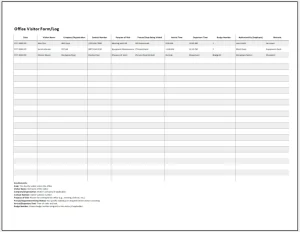 An office visitor form can help prevent these problems. It gives organizations a consistent way to record arrivals, notify hosts, explain visitor procedures, and keep track of departures. Whether it’s a paper sign-in sheet or part of a digital check-in system, a well-designed form supports a more welcoming and orderly workplace.
This guide explains what an office visitor form is, what to include, how to manage visitor information responsibly, and how to make the check-in process work for both guests and staff.
What Is an Office Visitor Form?
An office visitor form is a record used to document a person’s visit to a workplace. Visitors may complete it themselves at reception, or a staff member may enter the information on their behalf. The form can be printed or completed electronically through a kiosk, tablet, web form, or visitor-management system.
Organizations use visitor forms to:
- Identify who is on-site
- Record the purpose and timing of visits
- Notify employees when their guests arrive
- Explain relevant building or workplace rules
- Support emergency planning and site-security procedures
- Maintain a record of visits when one is needed
A visitor form is useful for more than office buildings. Schools, clinics, factories, coworking spaces, warehouses, and other facilities may also use a version tailored to their visitors and risks.
Why an Office Visitor Form Matters
It creates a consistent check-in process
Without a standard process, visitors may be greeted differently depending on who is at the front desk. A form establishes a repeatable routine: collect the necessary details, contact the host, explain any relevant procedures, and record the visitor’s arrival.
Consistency can make check-in faster and reduce confusion for reception staff and guests.
It helps staff know who is in the building
A current visitor record can help authorized staff understand who is on-site and where visitors are expected to be. This may be useful during an evacuation or other emergency. However, a visitor form is only one part of emergency preparedness; organizations should also have clear procedures for accounting for people and communicating during an incident.
The U.S. Occupational Safety and Health Administration (OSHA) recommends that employers develop and maintain an emergency action plan when required by applicable standards. Such plans can include procedures for reporting emergencies, evacuating, and accounting for employees after evacuation.[1]
It supports a professional welcome
A good visitor experience begins before a meeting starts. A simple, clearly worded form can set expectations, direct visitors to the right person, and make the arrival process feel organized rather than improvised.
It can reinforce site-specific procedures
Some workplaces require visitors to wear badges, remain with an escort, follow safety instructions, or avoid restricted areas. A check-in process gives staff a convenient opportunity to communicate those requirements. The details should be appropriate to the site, not copied blindly from a generic template.
What to Include in an Office Visitor Form
The right form collects enough information to serve its purpose without asking for unnecessary personal details.
Basic visit details
Common fields include:
- Visitor’s name
- Organization or company, if relevant
- Date and time of arrival
- Name of the employee or department being visited
- Purpose of the visit
- Visitor’s departure time
For a busy office, it may also be useful to record the arrival method or meeting location. Keep the fields easy to understand, and avoid asking visitors to guess what information is required.
Contact information, when needed
A phone number or email address may be useful for coordinating a visit, but it should not automatically be required for every guest. Consider whether the information is genuinely necessary for the visit and explain why it is being collected.
Host confirmation
A form or check-in system can record that the host has been contacted or that the visitor has been approved to proceed. This does not need to be a complicated field; a simple status such as “host notified” may be enough.
Acknowledgment of relevant instructions
If visitors need to follow specific rules, the form can include a short acknowledgment or link to instructions. Examples might include:
- Wearing a visitor badge
- Remaining in approved areas
- Staying with an employee escort
- Following site safety instructions
- Returning a badge before leaving
Avoid using a checkbox as a substitute for actually explaining important rules. Visitors should be able to see and understand the instructions before agreeing to them.
Additional requirements for particular sites
Depending on the workplace, the organization may need a process for confirming identity, recording a delivery, issuing a temporary badge, or handling contractor credentials. These requirements should be based on a documented operational or security need and reviewed by the appropriate internal teams.
Choosing Between Paper and Digital Forms
Neither paper nor digital check-in is automatically right for every organization. The best choice depends on visitor volume, available staff, privacy requirements, accessibility, and the complexity of the site.
Paper forms
Paper sign-in sheets are inexpensive and straightforward. They can work well for small offices with occasional visitors, especially when staff are available to greet guests.
Their limitations include handwriting that is difficult to read, pages that are easy to misplace, and the possibility that visitors can see information entered by earlier guests. If using paper, consider using individual forms rather than a shared sheet, storing completed forms securely, and setting a clear schedule for disposing of them.
Digital forms
A digital system can make it easier to notify hosts, record arrival and departure times, issue badges, and search for current visitor records. Some systems also support pre-registration or digital instructions.
Digital tools introduce their own considerations: the organization should assess access controls, data storage, service-provider practices, accessibility, and what happens if the system or network is unavailable. A digital form should not collect more information simply because it is easy to add another field.
A hybrid approach
Some offices use digital pre-registration and a staffed reception desk for arrival. Others keep a paper backup in case a kiosk is unavailable. A hybrid process can be practical, provided staff know which record is authoritative and how to handle records consistently.
Privacy: Collect Only What You Need
A visitor form contains personal information. Depending on the fields and how the records are used, it may include names, contact details, visit history, or other sensitive information. Organizations should handle these records deliberately.
The privacy principle of data minimization—collecting personal data that is adequate, relevant, and limited to what is necessary—appears in the European Union’s General Data Protection Regulation (GDPR).[2] The precise legal requirements that apply depend on the organization, its location, and how it handles the information.
Good practices include:
- Explain the purpose. Tell visitors why information is being collected and how it will be used.
- Limit collection. Ask only for information the organization needs for a defined purpose.
- Restrict access. Store completed forms where only authorized people can access them.
- Set a retention period. Decide how long records need to be kept and dispose of them securely when they are no longer needed.
- Protect visible information. Avoid shared sign-in sheets that reveal previous visitors’ details.
- Review vendors. For digital systems, understand where data is stored, who can access it, and how it is deleted.
- Provide an alternative when practical. Consider how visitors without a smartphone, or those who need assistance, can check in.
These are general considerations, not legal advice. Organizations should consult their privacy, legal, or compliance teams to determine which obligations apply.
Designing a Form Visitors Can Actually Use
A form should be quick to complete and easy to understand. A complicated process can create delays at reception and encourage staff to skip steps.
Use plain language
Prefer direct labels such as “Who are you visiting?” over internal department jargon. If a field is mandatory, mark it clearly and explain what to enter.
Keep the form short
Every field should have a purpose. If a detail is not used for security, coordination, safety, or another defined business need, consider removing it.
Make it accessible
Use readable text, good contrast, clear instructions, and a layout that works on the device being used. Provide a way to request assistance, and consider the needs of visitors with disabilities or limited familiarity with the technology.
Explain what happens next
Visitors should know whether to wait, contact their host, collect a badge, or proceed to a meeting area. A short message after submission can prevent uncertainty:
“Thank you for checking in. Please wait in reception while we notify your host.”
Keep the process welcoming
Security and hospitality are not opposites. A staff member’s greeting, a visible sign, and a clear next step can make a structured check-in feel friendly rather than suspicious.
A Sample Office Visitor Form
The following is a starting point, not a one-size-fits-all legal or security template.
OFFICE VISITOR CHECK-IN
- Visitor name: ______________________________
- Company or organization (optional): ______________________________
- Employee or department being visited: ______________________________
- Purpose of visit: ______________________________
- Date: ____________________
- Arrival time: ____________________
- Departure time: ____________________
Visitor instructions
- Please check in with reception before entering the workplace.
- Please wear your visitor badge while on-site.
- Please remain in approved visitor areas and follow any instructions from your host or staff.
- Please return your badge when you leave.
Host notified: ☐ Yes ☐ Not yet
Badge issued: ☐ Yes ☐ Not applicable
Visitor acknowledgment, if appropriate: ____________________
Additional notes, if necessary: ______________________________
An organization using this template should adjust the fields and instructions to its actual procedures, and remove anything it does not need.
Common Mistakes to Avoid
Asking for excessive personal information
Collecting a date of birth, home address, or identity-document details for every routine office visit may be unnecessary. Before adding a field, identify the reason for collecting it and consider whether a less intrusive option would work.
Leaving records out in the open
A visitor log sitting on a public counter can expose one guest’s information to another. Use individual forms, a staff-controlled screen, or another approach that prevents unnecessary disclosure.
Forgetting to record departures
An arrival log alone may not show whether a visitor is still on-site. If knowing current occupancy matters to the organization, build departure recording into the process and make it easy for visitors to complete.
Failing to train reception staff
A form does not enforce itself. Staff should understand how to notify hosts, issue and recover badges, respond to unregistered guests, and handle exceptions without creating unnecessary barriers.
Treating the form as a complete security system
A visitor form helps with recordkeeping, but it does not replace access controls, staff training, emergency procedures, or appropriate supervision. It should fit into a broader workplace process.
How to Implement an Office Visitor Form
A practical rollout can be done in a few steps:
- Define the purpose. Decide what the form needs to accomplish: for example, host notification, site instructions, or an occupancy record.
- Map the visitor journey. Follow the process from arrival through departure and identify where guests may become confused or delayed.
- Choose the format. Compare paper, digital, and hybrid approaches based on cost, volume, staffing, accessibility, and recordkeeping needs.
- Review the information collected. Remove fields that do not have a clear purpose, and consult the appropriate privacy or compliance staff.
- Write clear instructions. Keep them short and specific to the site.
- Test the form. Ask employees and a few first-time visitors to try it. Look for unclear wording, unnecessary steps, or accessibility problems.
- Train staff and set record-handling rules. Cover host notification, badges, departures, storage, retention, and exceptions.
- Review it periodically. Update the form when workplace procedures, technology, or requirements change.
Conclusion
An office visitor form is a small tool with a practical role: it helps organizations welcome guests, coordinate visits, and maintain a clearer record of who is on-site. The strongest forms are not necessarily the most detailed. They are the ones that collect only useful information, protect it appropriately, communicate expectations clearly, and fit smoothly into the day-to-day check-in process.
Start with the needs of your workplace, keep the visitor experience in mind, and review the process regularly. A well-managed visitor form can make arrivals more organized without making them less welcoming.
Sources
- U.S. Occupational Safety and Health Administration (OSHA), Emergency Action Plans.
- European Union, Regulation (EU) 2016/679, General Data Protection Regulation, Article 5(1)(c), Principles relating to processing of personal data.