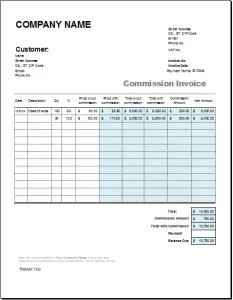
 Commission-based work can be rewarding, but calculating and documenting each payment takes care. A well-designed commission invoice helps you show how a commission was earned, what amount is due, and when payment is expected. Excel is a practical tool for creating one: it’s familiar, flexible, and can automate many of the calculations that would otherwise be done by hand.
This guide explains what to include in a commission invoice, how to build a reusable Excel template, and how to keep your records clear and consistent.
What Is a Commission Invoice?
A commission invoice is a request for payment when some or all of your compensation depends on a sale, referral, booking, or other measurable result. It may be used by sales representatives, agents, brokers, affiliates, recruiters, and independent contractors.
Unlike a simple invoice for a fixed fee, a commission invoice should make the calculation easy to verify. It typically identifies the underlying transaction and states how the commission rate was applied. For example:
Commission due = eligible sales amount × commission rate
The agreement between the parties determines what counts as an eligible sale. The commission might be calculated on the gross sale, the amount after discounts, or the amount collected after refunds and chargebacks. Spell out the basis rather than relying on the word “sales” alone.
Why Use Excel?
Excel works well for commission invoicing because you can adapt the layout to different clients and commission plans. Formulas can calculate totals, and a structured worksheet can help you compare transactions against sales reports or commission statements.
Excel is especially useful when:
- You invoice several clients with different rates.
- Commission is calculated from multiple transactions.
- You need a repeatable template for each billing period.
- You want to track invoice status alongside amounts due.
It’s still important to check the figures and terms. A spreadsheet can apply a formula consistently, but it cannot determine whether the rate, eligible amount, or transaction data is correct.
What to Include in a Commission Invoice
A clear invoice should help the recipient understand who is billing them, what the commission relates to, and how much to pay.
1. Your business and client details
Include your name or business name, mailing address, and contact information. Add the client’s legal or business name and billing address. If relevant, include business registration or tax identification details required in your jurisdiction.
2. Invoice number and dates
Assign each invoice a unique invoice number. Include the issue date and payment due date. A consistent numbering system—such as 2026-001 or CLIENT-026—makes invoices easier to locate and reference.
3. Commission period
State the period covered, such as “October 1–31, 2026.” This is particularly important if commissions are calculated monthly or quarterly.
4. Transaction details
List the sales or other events that generated the commission. Depending on your agreement, useful fields may include:
- Transaction date
- Order, deal, or account reference
- Customer or product name, where appropriate
- Eligible sale amount
- Adjustments, such as discounts or refunds
- Commission rate
- Commission amount
Avoid including personal or confidential customer information unless it is necessary and appropriate to share.
5. Calculation and total due
Show how the total was calculated. If different transactions have different rates, calculate them separately and then add them together. Include any approved expenses, taxes, withholding, credits, or other adjustments as separate line items rather than folding them into the commission figure.
6. Payment instructions and terms
State accepted payment methods and any relevant payment terms. If the parties have agreed to a specific due date or late-payment policy, make those terms clear and consistent with the governing agreement and applicable law.
A Simple Commission Invoice Layout for Excel
A useful workbook can contain one invoice sheet and, if needed, a separate transaction-data sheet. The invoice sheet might be organized as follows:
| Field | Example |
|---|---|
| Invoice number | 2026-014 |
| Issue date | November 15, 2026 |
| Due date | December 15, 2026 |
| Commission period | October 1–31, 2026 |
| From | Your business name and contact details |
| Bill to | Client name and billing details |
Then create a transaction table:
| Transaction date | Reference | Eligible amount | Rate | Commission |
|---|---|---|---|---|
| Oct. 4 | Order 1048 | $2,000.00 | 8% | $160.00 |
| Oct. 12 | Deal 2261 | $1,250.00 | 10% | $125.00 |
| Total commission | $285.00 |
At the bottom, show the commission subtotal and any separately agreed adjustments. Finish with the total amount due, payment details, and a brief note explaining how the commission was calculated.
Excel Formulas for Commission Calculations
Suppose eligible amounts are in column C and commission rates are in column D. In the first commission cell, enter:
=C2*D2
Format column D as a percentage and column C and the commission column as currency. Copy the formula down for each transaction.
To total the commission amounts in cells E2 through E20, use:
=SUM(E2:E20)
If the rate is fixed for the entire invoice, you can enter the rate in one cell—for example, H2—and use an absolute reference:
=C2*$H$2
The dollar signs keep the reference to H2 fixed when you copy the formula down.
Handling adjustments
If the commission is based on sales after discounts or refunds, add columns for those adjustments and calculate the eligible amount according to the written agreement. For instance, if gross sales are in C and discounts are in D, a simple adjusted amount might be:
=C2-D2
Then calculate the commission from that adjusted amount. The exact formula depends on the contract: do not assume that every discount, refund, tax, or shipping charge should be included or excluded.
Make the Template Easier to Use
A few small design choices can make an Excel invoice more reliable:
- Use Excel Tables for transaction data. Tables expand as you add rows and make it easier to manage formulas.
- Apply number formats deliberately. Use currency for money and percentage formatting for rates.
- Use data validation where appropriate. A list of approved commission rates can help prevent accidental entries.
- Separate inputs from formulas. Use clear headings and visually distinguish cells you fill in from cells calculated automatically.
- Avoid hard-coded totals. Use formulas so totals update when transactions change.
- Check for blank or invalid entries. A missing rate or transaction amount can lead to an incorrect total.
- Save a clean master copy. Duplicate the template for each billing period instead of overwriting your original.
For accessibility and readability, use descriptive column headings, avoid relying on color alone to communicate meaning, and make sure the printed or exported invoice is legible.
Common Mistakes to Avoid
Using an unclear commission basis
A rate by itself does not explain what it applies to. Specify whether the commission is based on gross revenue, net revenue, collected payments, or another defined amount.
Omitting transaction references
Without order or deal references, the client may struggle to reconcile the invoice with its own records. Include enough detail to support the calculation without exposing unnecessary information.
Mixing different commission rates
If rates differ by product, client, territory, or sales tier, show each calculation separately. A single average rate can obscure errors and make the invoice harder to audit.
Forgetting adjustments
Refunds, cancellations, credits, and chargebacks can affect commissions depending on the agreement. State how they are handled and show applicable adjustments clearly.
Treating the template as legal or tax advice
Invoice requirements and tax treatment vary by location and type of service. Confirm the applicable requirements for your business and have the parties’ commission terms documented in an agreement.
Keeping Good Commission Records
Save a copy of each issued invoice and retain the underlying calculations and supporting reports. Use clear file names, such as 2026-014_ClientName_CommissionInvoice.xlsx, and consider exporting a final invoice to PDF so the version sent to the client remains unchanged.
Reconcile the invoice against your sales or commission statement before sending it. If the client disputes a line, transaction-level detail and a consistent calculation method make it easier to resolve the issue.
Conclusion
A commission invoice in Excel should do more than present a total: it should show the transactions behind the commission and make the calculation easy to follow. Include clear business details, invoice dates, the covered period, transaction references, eligible amounts, rates, adjustments, and payment terms. Use formulas to reduce manual arithmetic, but verify that the spreadsheet matches the commission agreement.
A well-organized template can make recurring billing faster and more transparent—while giving both you and your client a clearer record of what is owed.
Sources
- Microsoft Support, “Create and format tables”: https://support.microsoft.com/en-us/office/create-and-format-tables-0b5b7a9c-2d9f-4d5e-9b62-7c5f4d4a5d1b
- Microsoft Support, “Overview of formulas in Excel”: https://support.microsoft.com/en-us/office/overview-of-formulas-in-excel-ecfdc708-9162-49e8-b993-c311f47ca173
- Microsoft Support, “Apply data validation to cells”: https://support.microsoft.com/en-us/office/apply-data-validation-to-cells-29fecbcc-d1b9-42c1-9d76-eff3ce5f7249
- Internal Revenue Service, “Recordkeeping”: https://www.irs.gov/businesses/small-businesses-self-employed/recordkeeping