A well-stocked pantry can make cooking easier, but it’s surprisingly easy to forget what’s tucked behind the pasta or buried at the back of a shelf. The result: duplicate purchases, ingredients expiring unnoticed, and last-minute trips to the store.
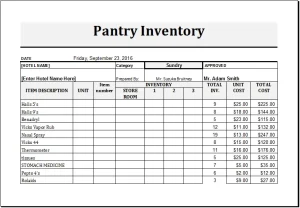 A pantry inventory template offers a simple solution. It gives you one place to record what you have, how much is left, and when items may need to be used. Whether you prefer a printed checklist, a spreadsheet, or a notes app, a little structure can help you shop and cook with more confidence.
What Is a Pantry Inventory Template?
A pantry inventory template is a reusable list or table for tracking the food and supplies stored in your pantry. Depending on your needs, it can cover dry goods, canned foods, spices, baking ingredients, snacks, oils, and household staples.
A useful template might include:
| Item | Category | Quantity | Storage location | Best-by date | Reorder level |
|---|---|---|---|---|---|
| Brown rice | Grains | 1 bag | Lower shelf | Oct. 2027 | 1 bag |
| Chickpeas | Canned goods | 4 cans | Left cabinet | May 2028 | 2 cans |
| Olive oil | Oils | ½ bottle | Counter cabinet | Jan. 2027 | 1 bottle |
The template doesn’t need to be elaborate. Its purpose is to make your pantry’s contents visible and easy to maintain.
Why Keep a Pantry Inventory?
Reduce food waste
When food is easy to overlook, it may sit unused until it’s past its best quality—or, in some cases, no longer safe to eat. An inventory helps you spot items to use soon and plan meals around what you already have.
The USDA recommends checking food storage guidance and using safe handling practices; date labels such as “best if used by” generally refer to quality rather than a universal safety deadline. When in doubt about a food’s safety, follow official guidance and don’t rely on appearance alone. USDA Food Safety and Inspection Service
Make grocery shopping more efficient
A current inventory can help you avoid buying another jar of cinnamon when there are already two in the cupboard. It also makes it easier to build a shopping list around actual needs rather than memory.
Make meal planning easier
Knowing what you have on hand can spark meal ideas. A few cans of beans, rice, and tomatoes might become a quick soup or grain bowl; flour, sugar, and baking powder could mean you’re ready to make pancakes without a special trip.
Keep storage organized
Grouping pantry items by category and recording where they belong can make it easier for everyone in the household to put groceries away and find ingredients.
What to Include in Your Template
Start with the fields that will genuinely help you. A template that is too complicated can become a chore, so add detail gradually.
Essential fields
- Item name: Use a specific name, such as “rolled oats” rather than “cereal.”
- Quantity: Record a count, weight, or practical estimate, such as “2 cans” or “about half a bag.”
- Category: Examples include grains, canned goods, baking, snacks, spices, and oils.
- Location: Note the shelf, cabinet, bin, or storage area.
- Best-by or use-by date: Record dates when they’re useful to your household.
- Reorder point: Set a minimum quantity that prompts you to buy more.
Optional fields
You could also include brand, package size, date opened, price, dietary notes, or whether an item is a household staple. If you store food in multiple areas—such as a pantry, basement shelf, and kitchen cupboard—location is especially useful.
Choosing a Format
The best template is the one you’ll actually update.
Printable checklist
A paper list works well if your pantry is in one place and you like to check items off by hand. Keep it on a clipboard, inside a cabinet door, or near your grocery list. A printed format is simple, but it needs to be rewritten or replaced when it gets messy.
Spreadsheet
A spreadsheet is helpful for larger households or people who want to sort and filter by category, quantity, or date. You can also add conditional formatting to highlight items that are running low or approaching a date you want to review.
Notes app or shared document
A shared digital list can be convenient when several people shop or cook. It’s easy to update from a phone, though a plain list may not offer the same sorting and filtering options as a spreadsheet.
Pantry-management app
Dedicated apps may offer barcode scanning, shared lists, or reminders. Features vary, so consider whether they make upkeep easier before entering your entire pantry.
How to Set Up Your Pantry Inventory
1. Take everything out—or work one section at a time
If your pantry is small, emptying it can help you see what you own and identify items that need attention. For a larger pantry, work shelf by shelf to keep the process manageable.
2. Group similar items
Sort food into broad categories: canned goods, grains, pasta, baking ingredients, spices, snacks, and so on. Categories make both the inventory and the physical pantry easier to scan.
3. Check packages and dates
Look for damaged packaging, signs of pests, and date information. Follow storage instructions on labels and reliable food-safety guidance. Date-marking terms can mean different things, so don’t treat every date as an automatic safety cutoff. USDA FSIS: Food Product Dating
4. Record what you have
Enter the item, its quantity, and its location. Use estimates if exact measurements would slow you down. “One unopened bag and one partly used bag” may be more practical than weighing every ingredient.
5. Put items back in a useful order
Keep frequently used items easy to reach. Place older products where they’re more likely to be used first, and store food according to package directions. The FDA advises keeping food storage areas clean and dry and checking for signs of pests. FDA: Food Safety at Home
6. Set reorder points
Choose a minimum amount for staples you buy regularly. For example, you might decide to add pasta to the shopping list whenever you have only one package left. A reorder point should reflect how quickly your household uses an item and how often you shop.
A Simple Pantry Inventory Template
Copy and adapt this table for your own pantry:
| Item | Category | Quantity on hand | Location | Date to review | Reorder at |
|---|---|---|---|---|---|
For a basic version, use just three columns: Item, Quantity, and Need to buy. You can add more fields later if you find yourself needing them.
Tips for Keeping It Up to Date
Choose a routine
Update the inventory during grocery unpacking, meal planning, or a weekly kitchen reset. Linking the task to an existing habit makes it easier to remember.
Track changes that matter
You don’t have to record every spoonful of flour. Update quantities when you finish a package, open a new one, or notice a staple is running low.
Use a “use soon” area
Set aside a small basket or shelf for items you want to use sooner. This can help connect your inventory to meal planning without requiring constant date checks.
Keep the template accessible
A list hidden in a drawer is easy to forget. Put a paper version where you can see it, or save the digital version somewhere easy to open while shopping.
Review what isn’t working
If certain fields never get updated, remove them. If you regularly run out of an item, adjust its reorder point. Your inventory should fit your household’s habits, not create extra work.
Common Pantry Inventory Mistakes
- Trying to record too much: Exact weights and detailed purchase histories may be unnecessary.
- Using inconsistent item names: “Beans,” “kidney beans,” and “red beans” can make searching and counting confusing.
- Forgetting backup storage areas: Include overflow cupboards or basement shelves if they contain food.
- Treating date labels as the only safety test: Follow storage instructions and food-safety guidance; when a product’s safety is uncertain, don’t take a chance.
- Creating a system nobody else can use: Keep categories and labels intuitive for everyone who shops or cooks.
Conclusion
A pantry inventory template can turn a crowded cupboard into a more useful kitchen resource. By tracking a few practical details—what you have, how much remains, where it’s stored, and when to restock—you can make grocery shopping easier and find more opportunities to use food you already own.
Start small: list your staples, choose a format you like, and update it as part of a routine you already follow. The most effective pantry inventory isn’t the most detailed one; it’s the one you can keep using.
Sources
- U.S. Department of Agriculture, Food Safety and Inspection Service. Food Product Dating
- U.S. Food and Drug Administration. Food Safety at Home