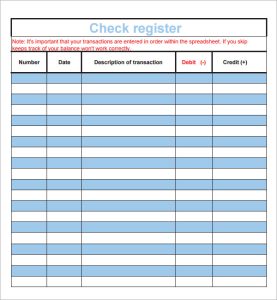
 A check register is a simple record with an important job: it helps you understand where your money is going and how much is actually available. Whether you manage household bills, a small business account, or a nonprofit’s expenses, a well-organized register can make it easier to track checks, debit transactions, deposits, fees, and account balances.
A sample check register template gives you a ready-made structure to start with. You can use one on paper, in a spreadsheet, or in bookkeeping software—and adapt it to fit the way you handle money. This guide explains what a check register should include, compares common template formats, and offers practical tips for using one accurately.
What Is a Check Register?
A check register is a chronological record of transactions affecting a checking account. Traditionally, it was used to record checks written from a paper checkbook. Today, it can also track debit-card purchases, electronic payments, deposits, bank fees, and other account activity.
A register complements your bank statement. It records transactions as you make them, while the statement shows transactions processed by the bank during a particular period. Comparing the two helps you spot pending payments, missed entries, and discrepancies.
A check register is not a substitute for a bank’s official records, tax documents, or accounting system. It is a practical day-to-day tracking tool.
What Should a Check Register Template Include?
A useful template typically contains the following columns:
| Column | What it records |
|---|---|
| Date | When the transaction was made or scheduled |
| Check number or reference | Check number, confirmation number, or another identifier |
| Payee or description | Who was paid, or what the deposit or transaction was for |
| Payment / debit | Money leaving the account |
| Deposit / credit | Money entering the account |
| Cleared status | Whether the bank has processed the transaction |
| Balance | The running account balance after the transaction |
You may also want optional columns for a category, account, project, invoice number, or notes. For example, a small business might categorize transactions as “supplies,” “travel,” or “utilities,” while a household might use categories such as “groceries” and “housing.”
Sample Check Register Template
Here is a basic format you can copy into a notebook or spreadsheet:
| Date | Check / Reference No. | Payee or Description | Payment / Debit | Deposit / Credit | Cleared? | Balance |
|---|---|---|---|---|---|---|
| 11/01/2026 | — | Opening balance | — | — | Yes | $2,400.00 |
| 11/03/2026 | 1042 | Rent | $1,000.00 | — | Yes | $1,400.00 |
| 11/05/2026 | — | Paycheck deposit | — | $1,850.00 | Yes | $3,250.00 |
| 11/06/2026 | DC-018 | Grocery store | $86.42 | — | No | $3,163.58 |
| 11/08/2026 | EFT-271 | Utility bill | $125.00 | — | No | $3,038.58 |
The running balance is calculated by adding deposits and subtracting payments. In a spreadsheet, you can automate the calculation. If the opening balance is in cell G2, and payments and deposits are in columns D and E, a formula for the next balance might look like:
=G2-D3+E3
Adjust the cell references to match your sheet’s layout.
Common Types of Check Register Templates
1. Paper Check Register
A paper register is a good fit if you prefer writing transactions down as they occur or want a low-tech record you can carry with you. It does not require a device or spreadsheet skills, but you’ll need to calculate balances yourself and keep the register in a safe place.
2. Basic Spreadsheet
A spreadsheet template is flexible and easy to customize. It can calculate running balances automatically, sort transactions, and filter by date or category. However, a spreadsheet only stays useful if you enter transactions consistently and protect the file appropriately.
3. Household Budget Register
A household-focused register may include spending categories, notes, and a monthly summary. It can help you see how checking-account activity relates to a broader budget, though it may need additional worksheets to track savings or credit-card accounts.
4. Small-Business Register
A business register may add fields for vendors, business purposes, payment methods, expense categories, or project codes. It can support routine bookkeeping, but it should not be treated as a complete accounting system when more formal financial reporting is required.
5. Shared or Online Register
An online spreadsheet or shared financial tool can be useful when multiple people need to record transactions. For shared use, decide who can edit the file, how changes will be reviewed, and how sensitive information will be protected. Avoid including full account numbers or other unnecessary confidential data.
How to Use a Check Register
Start with the Correct Opening Balance
Enter the account balance you are using as the starting point and note the date. If you begin partway through a statement period, make sure you know which earlier transactions have already been accounted for.
Record Transactions Promptly
Add transactions as soon as possible after writing a check, making a purchase, scheduling a payment, or receiving a deposit. Include enough detail to recognize the transaction later. “Market” may be less useful than “Groceries—Main Street Market.”
Track Pending Transactions
Mark whether each item has cleared the bank. A payment that is in your register but has not yet appeared on the bank’s records may still reduce the money you should consider available.
Reconcile the Register Regularly
Compare your register with your bank statement or online account activity. Check off transactions that appear in both places, investigate differences, and account for interest, fees, automatic payments, or deposits you may have missed.
Keep Records Secure
A register may reveal spending habits and financial details. Store paper copies securely, use device and account protections for digital files, and avoid sharing access more widely than necessary.
A Simple Monthly Reconciliation Checklist
At the end of a statement period:
- Compare each bank-listed transaction with your register.
- Mark transactions that have cleared.
- Add bank fees, interest, automatic payments, or deposits not yet recorded.
- Check for duplicate entries or incorrect amounts.
- Identify register entries that have not cleared yet.
- Compare the resulting balance with the bank’s balance, taking outstanding items into account.
- Save or file the statement and any supporting receipts or records you need.
If the figures do not match, review the arithmetic and transaction dates before assuming the bank made an error. A missing debit or duplicate deposit entry is often the cause.
Tips for Choosing the Right Template
Choose a template that is easy enough to maintain consistently. Consider:
- How you pay: If you mostly use electronic payments and debit cards, make sure the template has room for reference numbers and payment descriptions.
- Who will use it: A shared household or business register may need clear categories and a consistent entry process.
- How much detail you need: A personal register may need only a few fields; business records may need additional tracking.
- Whether you want automation: Spreadsheet formulas can reduce calculation work, but check them periodically for errors.
- How you store it: Consider access controls and data security, especially for online or shared files.
The best template is not necessarily the most elaborate one. It is the one you will update and review.
Common Mistakes to Avoid
- Recording only checks: Electronic transfers, card purchases, fees, and recurring payments also affect the balance.
- Waiting too long to enter transactions: Delayed entries make it easier to forget small purchases or scheduled bills.
- Confusing the bank balance with the available balance: Pending transactions may not yet appear in the bank’s posted balance.
- Skipping reconciliation: Regular comparison is what helps a register catch omissions and errors.
- Adding unnecessary sensitive information: A register generally does not need full account numbers, passwords, or security codes.
- Relying on a register alone for business compliance: Businesses may need more complete bookkeeping, supporting documentation, or professional advice.
Frequently Asked Questions
Is a check register still useful if I rarely write checks?
Yes. You can use a register to track debit-card purchases, electronic bill payments, deposits, and fees. The name is traditional; the tracking method is still useful.
How often should I update it?
Ideally, record transactions when they happen. At a minimum, review the register and compare it with bank activity regularly—such as weekly and whenever you receive a statement.
Can I use a spreadsheet as my official business records?
A spreadsheet can help track activity, but whether it is sufficient for your business depends on your needs and applicable rules. Keep supporting documents and consult a qualified bookkeeper or accountant if you need guidance on recordkeeping requirements.
Conclusion
A sample check register template can turn account activity into a clearer, more manageable record. Start with a simple layout that captures dates, descriptions, payments, deposits, cleared status, and a running balance. Then update it promptly and reconcile it against your bank records on a regular schedule.
For personal finances, a basic notebook or spreadsheet may be all you need. For a business or other organization, consider whether additional categories, documentation, and accounting tools are appropriate. Whatever format you choose, consistency and careful review matter more than complexity.
Sources
- Consumer Financial Protection Bureau (CFPB), Managing Your Checking Account: https://www.consumerfinance.gov/consumer-tools/bank-accounts/
- Federal Deposit Insurance Corporation (FDIC), Money Smart for Adults: https://www.fdic.gov/consumer-resource-center/money-smart-adults
- Internal Revenue Service (IRS), Recordkeeping: https://www.irs.gov/businesses/small-businesses-self-employed/recordkeeping