Running a daycare means balancing hands-on care with the administrative work that keeps the business organized. A clear, consistent bill helps families understand what they owe, when payment is due, and which services the charge covers. It also gives your daycare a useful record of payments and outstanding balances.
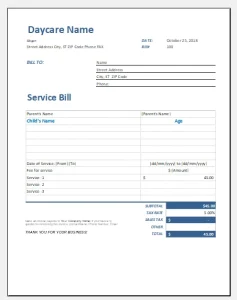 This guide explains what to include in a daycare service bill template, how to handle common childcare charges, and how to create a billing process that is easier for both providers and parents.
What Is a Daycare Service Bill?
A daycare service bill is a document that summarizes charges for childcare and related services during a specific billing period. Depending on how your center operates, you might send one before payment is due, after care has been provided, or on a recurring schedule.
A bill is sometimes called an invoice or statement, but the terms can mean different things in practice:
- Invoice: A request for payment, often issued before or when payment is due.
- Receipt: Confirmation that payment has been received.
- Statement: A summary of charges, payments, credits, and any remaining balance over a period of time.
Using the right document—and labeling it clearly—can help prevent confusion.
Why Use a Daycare Bill Template?
A reusable template creates a consistent format for every family. That consistency can help you:
- Show exactly how a total was calculated.
- Reduce misunderstandings about rates, dates, and fees.
- Track bills, payments, and unpaid balances.
- Keep records organized for bookkeeping and tax preparation.
- Communicate payment terms in the same way to all families.
A template can be created in a word processor, spreadsheet, accounting program, or childcare-management platform. The important thing is that it is readable, accurate, and suited to your billing process.
What to Include in a Daycare Service Bill Template
1. Provider information
Include the details families need to identify and contact your daycare:
- Daycare or business name
- Mailing address
- Phone number and email address
- Website or parent-portal information, if applicable
- Business or tax identification details, if appropriate for your jurisdiction
Use the same business name and contact details that appear in your enrollment documents.
2. Bill number and dates
Give each bill a unique invoice or reference number. Also include:
- Issue date: When you prepared or sent the bill.
- Billing period: The dates the charges cover.
- Due date: When payment is expected.
These dates make it easier to distinguish one billing cycle from another and to follow up on an unpaid bill.
3. Parent or guardian details
List the name of the person responsible for payment, along with the child’s name. If a family has more than one enrolled child, show each child separately or clearly identify which charges relate to which child.
Avoid including unnecessary personal or sensitive information. A bill generally does not need a child’s medical details or other private records.
4. Itemized services and charges
Instead of showing only one total, break the bill into understandable line items. Depending on your program, these could include:
| Description | Dates or quantity | Rate | Amount |
|---|---|---|---|
| Full-time childcare | Monthly | $1,200.00 | $1,200.00 |
| Early drop-off | 4 days | $10.00 | $40.00 |
| Late pickup | 1 occurrence | $25.00 | $25.00 |
| Registration fee | One-time | $75.00 | $75.00 |
| Total charges | $1,340.00 |
The figures above are examples only. Use your own rates and the terms in your enrollment agreement.
For recurring tuition, state whether the charge covers a calendar month, a set number of attendance days, or another schedule. If families pay a flat weekly or monthly rate regardless of attendance, explain that policy in your contract and make sure the bill wording is consistent with it.
5. Credits, subsidies, and adjustments
Show any applicable reductions as separate entries, such as:
- Payments already received
- Subsidy or assistance payments applied to the account
- Discounts permitted by your policy
- Account credits
- Adjustments or corrections
A clear breakdown helps families see how you arrived at the final amount.
6. Total due and payment instructions
Make the amount due easy to find. Include:
- Total charges
- Credits or payments applied
- Remaining balance
- Payment due date
- Accepted payment methods
- Where or how to pay
If you accept electronic payments, specify the approved method without exposing sensitive account information. For example, direct families to a secure payment portal rather than printing full bank details on every bill.
7. Late-payment terms
If your written policies allow late fees, returned-payment fees, or other penalties, state the relevant terms clearly. Include when the fee applies and how it is calculated. Avoid adding a charge that is inconsistent with your contract or local law.
A short reminder might read: “Payment is due by the 5th of each month. Any late fee will be applied only as described in the signed enrollment agreement.”
8. Notes and contact information
Use a brief notes section for practical messages, such as a reminder that a payment has been credited or an explanation of an adjustment. Tell families whom to contact if they have questions about the bill.
A Simple Daycare Bill Template
You can adapt the following outline:
[Daycare Name]
[Address] · [Phone] · [Email]DAYCARE SERVICE INVOICE
Invoice number: [Number]
Issue date: [Date]
Billing period: [Start date–End date]
Due date: [Date]Bill to: [Parent/guardian name]
Child: [Child’s name]
Service or charge Dates/quantity Rate Amount [Childcare tuition] [Period] [$] [$] [Additional service] [Quantity] [$] [$] [Fee, if applicable] [Quantity] [$] [$] Subtotal: [$]
Credits/payments: [$]
Balance due: [$]Payment instructions: [Method and where to pay]
Payment terms: [Due date and applicable policy]
Questions? Contact [Name/contact details].
Include only charges that apply, and check the bill against your attendance, enrollment, and payment records before sending it.
How to Set Up a Reliable Billing Process
Choose a predictable billing schedule
Decide whether you will bill weekly, biweekly, monthly, or on another schedule. Tell families when bills are issued and when payment is due. Predictability helps parents plan and helps staff manage follow-ups.
Keep billing consistent with your agreement
Your enrollment contract or parent handbook should explain the rates, billing periods, payment deadlines, absence policies, and any additional fees. The bill should reflect those written terms—not introduce new ones.
Record payments promptly
When a payment arrives, record its date, amount, method, and the account to which it was applied. Send a receipt or updated statement when appropriate. This creates a clearer record for both the daycare and the family.
Protect family information
Bills contain personal and financial information. Use secure systems when sending or storing them, limit access to staff who need it, and avoid including unnecessary details. If you use email, consider whether your method is appropriate for the information being shared.
Review bills before sending
A quick checklist can prevent avoidable errors:
- Correct family and child
- Correct billing period
- Accurate rates and quantities
- Payments and credits applied
- Clear balance and due date
- Terms consistent with the signed agreement
- No unnecessary sensitive information
Common Mistakes to Avoid
Showing a total without an explanation
A single amount may be difficult for a parent to verify. Itemized charges and credits make the bill easier to understand.
Using unclear billing periods
A charge labeled only “tuition” may leave families wondering what dates it covers. Add the period or state that it is a recurring charge under the agreed schedule.
Applying fees inconsistently
If your policies include additional fees, apply them according to the same written rules for every family. Document exceptions and corrections.
Treating a bill as proof of payment
An invoice shows what is owed; it does not necessarily show that it has been paid. Issue a receipt or update the account record after receiving payment.
Relying on a template without checking local requirements
Billing, childcare licensing, tax, privacy, and consumer-protection requirements can vary by location. A template is an administrative aid, not a substitute for reviewing applicable rules or getting professional advice when needed.
Digital Templates and Billing Software
A spreadsheet may be enough for a small program, especially if you have a limited number of families and a straightforward fee structure. As enrollment grows, childcare-management or accounting software may help with recurring invoices, payment tracking, reminders, and reports.
Whatever tool you choose, check that it supports your actual workflow. Consider whether it can:
- Separate charges by child or service
- Track partial payments and credits
- Produce receipts and account statements
- Restrict access to financial information
- Export records for bookkeeping
- Send reminders without changing agreed payment terms
Automation can save time, but it does not remove the need to review charges for accuracy.
Conclusion
A well-designed daycare service bill template does more than request payment. It explains the charges, identifies the billing period, records credits, and gives families clear instructions for paying or asking questions. Start with a simple, itemized format, keep it consistent with your enrollment agreement, and review it for accuracy and privacy before each bill is sent.
Sources
- Internal Revenue Service (IRS), Recordkeeping: guidance on keeping organized business records, including supporting documents for income and expenses. irs.gov/businesses/small-businesses-self-employed/recordkeeping
- U.S. Small Business Administration, Manage your finances: small-business guidance on financial records and managing business finances. sba.gov/business-guide/manage-your-business/manage-your-finances
- Federal Trade Commission, Protecting Personal Information: A Guide for Business: practical guidance for businesses on safeguarding personal information. ftc.gov/business-guidance/resources/protecting-personal-information-guide-business
This article provides general administrative guidance, not legal, tax, or accounting advice. Check the requirements that apply in your location.