Home Renovation Budget Template
Home Renovation Budget Template: Your Key to Staying on Track
Embarking on a home renovation project is exciting, but it can quickly become overwhelming and financially draining if not properly managed. A well-structured home renovation budget template is your essential tool for staying on track, avoiding unexpected expenses, and bringing your vision to life without breaking the bank.
Why Use a Home Renovation Budget Template?
A budget template offers several key advantages:
- Financial Control: It provides a clear overview of your estimated costs, helping you allocate funds effectively and avoid overspending.
- Reduced Stress: Knowing where your money is going reduces anxiety and allows you to focus on the creative aspects of the project.
- Informed Decision-Making: The template helps you compare quotes, negotiate prices, and make informed decisions about materials and labor.
- Project Prioritization: By outlining all costs, you can prioritize essential elements and identify areas where you might be able to save money.
- Contingency Planning: A good template includes a contingency fund to cover unforeseen issues and unexpected expenses that invariably arise during renovation projects.
- Tracking Progress: As the project progresses, you can track actual expenses against your budget, allowing you to identify potential overruns early and take corrective action.
Key Components of a Comprehensive Budget Template
A robust home renovation budget template should include the following sections:
1. Project Overview
This section provides a high-level summary of the project. Include:
- Project Name: E.g., “Kitchen Remodel,” “Bathroom Renovation,” “Basement Finishing.”
- Project Description: A brief description of the scope of work.
- Project Start Date: Estimated start date of the renovation.
- Project End Date: Estimated completion date.
- Budget Goal: Your overall target budget for the entire project.
2. Detailed Cost Breakdown
This is the heart of your budget. Break down the project into individual cost categories with specific line items. Be as detailed as possible. Here are some common categories and examples of line items:
A. Demolition & Disposal
- Demolition Labor
- Demolition Permits
- Waste Disposal (Dumpster Rental)
- Material Removal
B. Materials
- Flooring: Type of flooring (e.g., hardwood, tile, carpet), quantity, and cost per unit.
- Cabinets: Type of cabinets (e.g., custom, semi-custom, stock), quantity, and cost per cabinet.
- Countertops: Material (e.g., granite, quartz, laminate), size, and cost per square foot.
- Appliances: Refrigerator, oven, dishwasher, microwave, etc. – brand, model, and price.
- Fixtures: Sink, faucet, toilet, showerhead, lighting fixtures – brand, model, and price.
- Paint: Primer, paint (specify brand, type, and quantity).
- Hardware: Knobs, pulls, hinges, etc.
- Lumber: For framing, structural repairs, or trim work.
- Plumbing Supplies: Pipes, fittings, valves.
- Electrical Supplies: Wiring, outlets, switches, light fixtures.
- Tiles and Backsplash: Type of tile, quantity, and cost.
C. Labor
- General Contractor: If applicable – hourly rate or fixed fee.
- Plumber: Hourly rate or fixed fee for plumbing work.
- Electrician: Hourly rate or fixed fee for electrical work.
- Carpenter: Hourly rate or fixed fee for carpentry work.
- Tile Installer: Cost per square foot for tile installation.
- Painter: Hourly rate or fixed fee for painting.
- Drywaller: Hourly rate or fixed fee for drywall work.
- Demolition Crew: Hourly rate or fixed fee for demolition.
D. Permits & Inspections
- Building Permit
- Electrical Permit
- Plumbing Permit
- Inspection Fees (electrical, plumbing, structural)
E. Design & Planning
- Architect Fees (if applicable)
- Interior Designer Fees (if applicable)
- Blueprints and Drawings
- Consultation Fees
F. Miscellaneous
- Tools and Equipment Rental
- Protective Gear (masks, gloves, eye protection)
- Cleaning Supplies
- Unexpected Expenses (add a buffer for unforeseen issues)
3. Contingency Fund
This is a crucial component often overlooked. Set aside a percentage of your total budget (typically 10-20%) as a contingency fund to cover unexpected expenses. Renovations often uncover hidden problems like water damage, outdated wiring, or structural issues that require immediate attention. Without a contingency fund, you may have to cut corners elsewhere or take on additional debt.
4. Payment Schedule
Outline the payment schedule for contractors and suppliers. This section helps you track payments and ensure that funds are disbursed according to the agreed-upon terms. Include:
- Vendor/Contractor Name
- Payment Milestone (e.g., deposit, completion of framing, completion of electrical)
- Payment Amount
- Payment Date (Planned)
- Payment Date (Actual)
- Payment Method
5. Actual vs. Budgeted Costs
This is where you track your actual spending against your estimated budget. As the project progresses, update this section regularly with the actual costs incurred for each line item. This allows you to identify any overruns or savings and make necessary adjustments. Include columns for:
- Line Item
- Budgeted Cost
- Actual Cost
- Variance (Difference between Budgeted and Actual)
- Notes (Explanation for any significant variances)
6. Summary & Totals
This section provides a summary of the overall budget, including:
- Total Budgeted Cost
- Total Actual Cost
- Total Variance
- Remaining Funds (if any)
- Percentage of Budget Spent
Tips for Creating and Using Your Budget Template
- Research Thoroughly: Get multiple quotes from contractors and suppliers for each item. Don’t settle for the first price you receive.
- Be Realistic: Don’t underestimate costs. It’s better to overestimate and have some funds left over than to run out of money halfway through the project.
- Prioritize Needs vs. Wants: Identify essential elements of the renovation and prioritize them over purely cosmetic upgrades.
- Consider DIY Options: If you’re handy, consider tackling some of the work yourself to save on labor costs. However, be realistic about your skills and time constraints.
- Shop Around for Materials: Compare prices at different stores and online retailers. Look for sales and discounts.
- Negotiate Prices: Don’t be afraid to negotiate with contractors and suppliers. They may be willing to offer discounts or price matching.
- Track Expenses Diligently: Keep accurate records of all expenses. Use a spreadsheet, budgeting software, or a dedicated notebook to track your spending.
- Update Your Budget Regularly: As the project progresses, update your budget with actual costs and adjust your plan as needed.
- Communicate with Your Contractor: Maintain open communication with your contractor to address any potential issues or cost overruns promptly.
- Review and Revise: Regularly review your budget and make necessary revisions as the project evolves. Be prepared to adjust your plans if unexpected expenses arise.
Choosing a Budget Template Format
You can create a budget template using various formats, including:
- Spreadsheet Software (Excel, Google Sheets): This is the most common and flexible option, allowing you to easily customize the template, perform calculations, and track expenses.
- Budgeting Software (Mint, YNAB): These programs offer features for tracking spending, setting goals, and generating reports. Some also offer specific templates for home renovations.
- Printable Templates (PDF, Word): These templates are readily available online and can be printed out and filled in manually. They are less flexible than spreadsheet templates but can be useful for smaller projects.
- Project Management Software (Asana, Trello): Some project management tools include budgeting features or can be integrated with budgeting software to provide a comprehensive view of the project.
Ultimately, the best budget template is the one that works best for you and helps you stay organized, informed, and in control of your renovation project. By taking the time to create and maintain a detailed budget, you can minimize stress, avoid financial surprises, and achieve your dream home without breaking the bank.
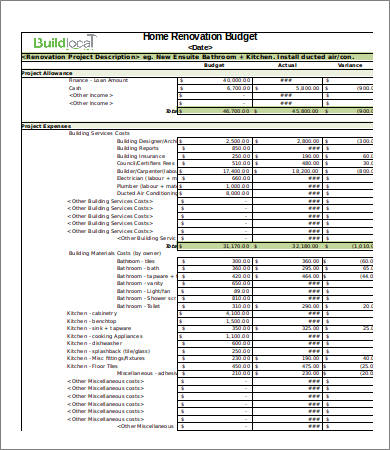 390×450 renovation budget template from templatedocs.net
  440×570 sample renovation budget templates docs from www.template.net
  1166×791 renovation budget template australia home renovation budget spreadsheet from db-excel.com
  873×681 home renovation budget template excel tmp from exceltmp.com
  1920×1080 home renovation budget template august from millennialhomeowner.com
  736×1079 home renovation budget spreadsheet template renovation spreadsheet from db-excel.com
  1126×733 renovation budget spreadsheet template google spreadshee home from db-excel.com


Home Renovation Budget Template :
Home Renovation Budget Template was posted in September 22, 2025 at 1:16 pm. If you wanna have it as yours, please click the Pictures and you will go to click right mouse then Save Image As and Click Save and download the Home Renovation Budget Template Picture.. Don’t forget to share this picture with others via Facebook, Twitter, Pinterest or other social medias! we do hope you'll get inspired by SampleTemplates123... Thanks again! If you have any DMCA issues on this post, please contact us!
Related For Home Renovation Budget Template

Short Film Budget Template PDF Down
Short Film Budget Template PDF Download Club Sponsorship LetterBudget Tracker For Paying Off Credi
Conquer Credit Card Debt with a Strategic Budget Tracker
Sample Project Budget Template
Sample Project Budget Template IT Proposal Budget Form PDF