Budgeting Template For Amazon Orders
Amazon Order Budgeting Template: A Practical Guide
Budgeting for Amazon purchases can be a game-changer for managing your finances and avoiding impulse buys. Amazon’s vast selection and easy checkout can easily lead to overspending. This guide provides a budgeting template and actionable advice to regain control of your Amazon spending.
Why Budget for Amazon Purchases?
* **Control Spending:** A budget helps you allocate funds specifically for Amazon, preventing it from eating into other essential expense categories. * **Identify Spending Patterns:** Tracking your purchases reveals where your money is actually going. Are you buying too many non-essential items? * **Minimize Impulse Buys:** A predetermined budget acts as a mental barrier against spontaneous purchases. * **Achieve Financial Goals:** By managing Amazon spending, you can allocate those saved funds towards debt reduction, investments, or other financial priorities. * **Reduce Clutter:** Being mindful of your purchases helps curb the accumulation of unnecessary items.
The Amazon Budgeting Template: A Customizable Approach
This template offers a structured approach to budgeting your Amazon spending. You can adapt it to your specific needs and preferences.
1. Initial Assessment: Track Your Past Spending
Before creating a budget, understand your current spending habits. Analyze your past Amazon purchase history (order history readily available within your Amazon account). * **Timeframe:** Analyze the last 3-6 months. * **Categories:** Group purchases into categories (e.g., groceries, household goods, clothing, electronics, gifts, entertainment, books, subscriptions). * **Total Spend Per Category:** Calculate the total amount spent in each category. * **Average Monthly Spend:** Calculate your average monthly spending on Amazon across all categories. This data provides a baseline for creating a realistic budget. If you’re shocked by your past spending, don’t be discouraged. It’s the first step towards improvement.
2. Define Your Budget Categories
Refine your categories based on your needs and spending patterns. Examples: * **Essentials:** Groceries (if applicable), household supplies, personal care items, pet supplies, diapers/baby formula. These are needs, not wants. * **Home Improvement:** Tools, hardware, décor, gardening supplies. * **Clothing/Shoes:** Apparel for yourself and your family. * **Electronics/Gadgets:** Phones, tablets, accessories, peripherals. * **Books/Media:** Books, movies, music, games. * **Gifts:** Birthday gifts, holiday gifts, thank you gifts. * **Hobbies/Crafts:** Art supplies, sports equipment, musical instruments. * **Subscriptions:** Amazon Prime, Kindle Unlimited, Audible. * **Miscellaneous:** Everything else. This should ideally be a small category.
3. Allocate Funds to Each Category
Based on your spending analysis and priorities, allocate a monthly budget to each category. * **Prioritize Essentials:** Allocate sufficient funds for essential items. * **Set Realistic Limits:** Don’t drastically cut back on spending if it’s unrealistic to maintain. Gradual adjustments are more sustainable. * **Zero-Based Budgeting:** An effective technique is to assign every dollar a purpose. Income – Expenses = Zero. Any leftover funds can be allocated to debt repayment or savings. * **Consider Seasonal Variations:** Adjust budgets for seasons. For example, allocate more for gifts during the holidays. * **Buffer for Unexpected Needs:** Include a small “Miscellaneous” or “Contingency” category for unexpected essential purchases. **Example Budget Allocation (Illustrative):** | Category | Monthly Budget | | —————- | ————– | | Essentials | $100 | | Home Improvement | $50 | | Clothing/Shoes | $75 | | Electronics/Gadgets | $25 | | Books/Media | $20 | | Gifts | $30 | | Hobbies/Crafts | $20 | | Subscriptions | $15 | | Miscellaneous | $15 | | **Total** | **$350** |
4. Tracking Your Purchases
The most important part of budgeting is tracking. If you don’t track where your money is going, you can’t stay on budget. * **Spreadsheet:** Create a simple spreadsheet (Google Sheets, Microsoft Excel) to record each Amazon purchase. Include the date, item description, category, and amount spent. * **Budgeting Apps:** Consider using budgeting apps like Mint, YNAB (You Need a Budget), or Personal Capital. Many allow you to track spending across categories and link your Amazon account. * **Dedicated Notebook:** A physical notebook can work too, especially for those who prefer a more hands-on approach. * **Amazon Order History:** Regularly review your Amazon order history to ensure accurate tracking. Categorize each purchase into your budget categories.
5. Review and Adjust Regularly
Budgeting is not a one-time task. Review your budget and spending regularly (at least monthly). * **Analyze Spending vs. Budget:** Compare your actual spending to your budgeted amounts. * **Identify Overspending:** Pinpoint categories where you consistently exceed your budget. * **Adjust Budget as Needed:** If you consistently overspend in a particular category, consider adjusting your budget accordingly. Perhaps you underestimated the cost of essentials or need to reduce spending on non-essential items. * **Re-evaluate Priorities:** As your life changes, your financial priorities may shift. Adjust your budget to reflect these changes. * **Celebrate Successes:** Acknowledge and reward yourself (within your budget, of course) for sticking to your budget goals.
Tips for Staying on Budget with Amazon
* **Create a Wish List:** Before making a purchase, add the item to your wish list and wait at least 24-48 hours (or longer). This helps curb impulse buys. * **Utilize Amazon’s Price Tracking Tools:** Tools like CamelCamelCamel or Keepa track price fluctuations and alert you to price drops. This ensures you’re getting the best deal and avoiding overpaying. * **Subscribe & Save Strategically:** Only subscribe to items you regularly use and need. Avoid subscribing just for the discount if you don’t need the product. * **Shop Amazon Warehouse:** Amazon Warehouse offers discounted prices on open-box or used items in good condition. * **Take Advantage of Amazon Coupons:** Regularly check for coupons and discounts before making a purchase. * **Use a Rewards Credit Card:** If you pay your balance in full each month, using a rewards credit card can earn you points or cashback on your Amazon purchases. * **Cancel Unused Subscriptions:** Regularly review your Amazon subscriptions and cancel any that you no longer use. * **Avoid One-Click Ordering:** Disable one-click ordering to give yourself time to reconsider before completing a purchase. * **Unsubscribe from Promotional Emails:** Limit exposure to tempting advertisements by unsubscribing from Amazon promotional emails. * **Set Spending Alerts:** Many banks and credit card companies offer spending alerts that notify you when you reach a certain spending threshold.
Leveraging Amazon’s Features for Budgeting
* **Amazon Household:** Share Prime benefits and digital content with family members while maintaining separate payment methods. This helps avoid accidental purchases. * **Amazon Smile:** Support your favorite charity with every purchase at no extra cost. It encourages mindful spending. * **Order History Reports:** Download your order history in CSV format for more detailed analysis in a spreadsheet program.
Conclusion
Budgeting for Amazon purchases requires discipline and consistent tracking. By implementing a budgeting template, following the tips outlined above, and utilizing Amazon’s features, you can gain control over your spending, minimize impulse buys, and achieve your financial goals. Remember to review and adjust your budget regularly to ensure it reflects your current needs and priorities. The key is to be proactive and mindful of your spending habits. Good luck!
 1588×1313 handmade amazon seller template amazon profit excel spreadsheet from www.etsy.com
  1724×767 budgeting template google docs track lucas from medium.com
 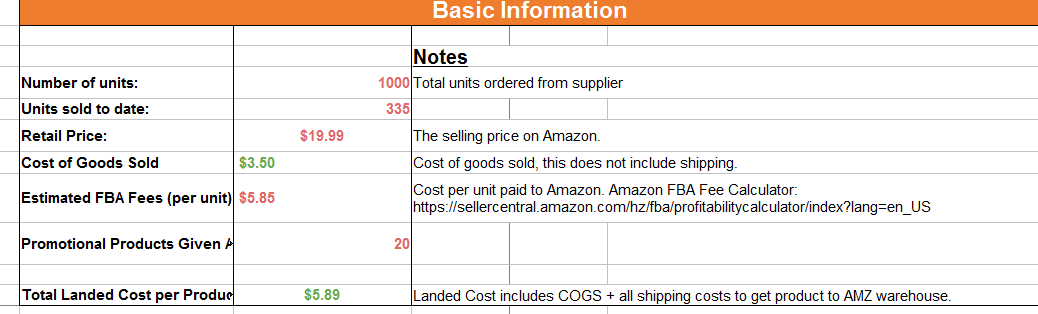 1038×314 set amazon budget from projectlifemastery.com


Budgeting Template For Amazon Orders :
Budgeting Template For Amazon Orders was posted in September 17, 2025 at 2:09 pm. If you wanna have it as yours, please click the Pictures and you will go to click right mouse then Save Image As and Click Save and download the Budgeting Template For Amazon Orders Picture.. Don’t forget to share this picture with others via Facebook, Twitter, Pinterest or other social medias! we do hope you'll get inspired by SampleTemplates123... Thanks again! If you have any DMCA issues on this post, please contact us!
Related For Budgeting Template For Amazon Orders

Budget Proposal Format Free Downloa
Budget Proposal Format Free Download BPMN Type Dimensions TemplateFreeSmall Business Budget & Tax Bundle
Small Business Budget & Tax Bundle Small Business BudgetYouTube Channel Budget Planner
Planning a budget for your YouTube channel can feel