Mortgage Payment Tracker Spreadsheet
Mortgage Payment Tracker Spreadsheet: Your Path to Financial Clarity
Managing a mortgage is a significant financial undertaking. Keeping track of payments, interest accrued, principal paid, and remaining balance can feel overwhelming. A well-designed mortgage payment tracker spreadsheet offers a powerful and organized solution. This guide delves into the creation and utilization of such a spreadsheet, empowering you to stay on top of your mortgage and potentially save money in the long run.
Benefits of Using a Mortgage Payment Tracker Spreadsheet
Before diving into the how-to, let’s explore the advantages of utilizing a dedicated mortgage tracker:
- Enhanced Organization: Consolidates all crucial mortgage information in one readily accessible location.
- Payment Monitoring: Tracks each payment made, ensuring accuracy and identifying potential discrepancies.
- Principal and Interest Breakdown: Clearly separates the principal and interest portions of each payment, providing insight into how your money is being allocated.
- Balance Tracking: Monitors the remaining mortgage balance, allowing you to visualize progress toward payoff.
- Amortization Schedule Visualization: Replicates the amortization schedule, illustrating how your payments gradually shift from interest-heavy to principal-heavy over time.
- Financial Planning: Facilitates informed financial planning by providing accurate data for budgeting, forecasting, and potential refinancing analyses.
- Tax Preparation: Simplifies tax preparation by providing a readily available record of interest paid throughout the year.
- Error Detection: Helps identify potential errors in your mortgage statement or loan servicing.
- Motivation: Provides visual confirmation of progress, motivating you to stay on track with payments and potentially explore opportunities for accelerated payoff.
Building Your Mortgage Payment Tracker Spreadsheet
You can create a mortgage payment tracker using spreadsheet software like Microsoft Excel, Google Sheets, or Numbers. Here’s a step-by-step guide:
1. Setting Up Initial Loan Information
Begin by creating columns to store your initial loan details. These details are essential for the spreadsheet to accurately calculate and track your mortgage:
* Loan Amount: The original principal amount borrowed. * Interest Rate: The annual interest rate on the loan (expressed as a decimal, e.g., 0.05 for 5%). * Loan Term (in years): The total duration of the loan, usually 15, 20, or 30 years. * Start Date: The date of the first mortgage payment. * Monthly Payment: The fixed monthly payment amount (including principal and interest, but excluding property taxes and insurance, which you’ll track separately). If you don’t know this, you can use the PMT function in most spreadsheet programs: `PMT(interest_rate/12, loan_term*12, -loan_amount)`.
2. Creating the Payment Schedule
This section will track individual payments and their impact on the loan balance. Create the following columns:
* Payment Number: A sequential number representing each payment (1, 2, 3, and so on). * Date: The date the payment was made. * Payment Amount: The total amount of the payment. * Interest Paid: The portion of the payment that goes towards interest. Calculate this using: `Remaining Balance * (Interest Rate / 12)`. * Principal Paid: The portion of the payment that goes towards reducing the principal. Calculate this using: `Payment Amount – Interest Paid`. * Remaining Balance: The outstanding loan balance after each payment. Calculate this using: `Previous Remaining Balance – Principal Paid`.
3. Implementing Formulas
Formulas are the backbone of your spreadsheet, automating calculations and ensuring accuracy. Here’s how to implement them:
* Payment Number: The first row should be ‘1’. Subsequent rows can use the formula `=Previous Row’s Payment Number + 1`. * Date: The first row’s date should be the Start Date. Subsequent rows can use the formula `=EDATE(Previous Row’s Date, 1)` to automatically increment the date by one month. * Payment Amount: Enter the fixed monthly payment amount in each row. You can link this to the initial “Monthly Payment” cell for easy modification. * Interest Paid: In the first payment row, use the formula `=(Loan Amount * Interest Rate) / 12`. In subsequent rows, use the formula `=(Previous Row’s Remaining Balance * Interest Rate) / 12`. * Principal Paid: In each row, use the formula `=Payment Amount – Interest Paid`. * Remaining Balance: In the first payment row, use the formula `=Loan Amount – Principal Paid`. In subsequent rows, use the formula `=Previous Row’s Remaining Balance – Principal Paid`.
4. Formatting for Clarity
Proper formatting enhances readability and makes the spreadsheet easier to understand:
* Headers: Use bold text and contrasting colors for column headers. * Currency: Format currency columns (Loan Amount, Payment Amount, Interest Paid, Principal Paid, Remaining Balance) as currency with two decimal places. * Dates: Format date columns as dates (e.g., MM/DD/YYYY). * Borders: Add borders to cells to delineate sections and columns. * Freezing Panes: Freeze the top row (column headers) and the first column (Payment Number) to keep them visible while scrolling.
5. Tracking Additional Expenses (Optional)
You can expand your spreadsheet to track additional mortgage-related expenses:
* Property Taxes: Add a column to track property taxes paid each year (or monthly, if escrowed). * Homeowners Insurance: Add a column to track homeowners insurance premiums paid each year (or monthly, if escrowed). * PMI (Private Mortgage Insurance): If applicable, add a column to track PMI payments. * Escrow Payment: If your taxes and insurance are escrowed, add a column to track the total escrow payment.
6. Extra Payments and Recalculation
One of the most valuable features is the ability to model the impact of extra payments. Add a column labeled “Extra Payment”.
* When you make an extra payment, enter the amount in the “Extra Payment” column for that month. * Modify the “Payment Amount” formula to `=Regular Monthly Payment + Extra Payment`. Make sure to still only deduct the interest portion from the remaining balance. The extra payment goes directly to principal. The formulas in the “Interest Paid,” “Principal Paid,” and “Remaining Balance” columns will automatically adjust to reflect the impact of the extra payment. This will show you how much faster you can pay off your mortgage and how much interest you’ll save.
7. Conditional Formatting (Optional)
Use conditional formatting to highlight specific cells or rows based on certain criteria:
* Highlight rows where the “Remaining Balance” falls below a certain threshold. * Highlight extra payments to easily identify months where you paid more than the minimum.
Tips for Using Your Mortgage Payment Tracker
* Accuracy is Key: Double-check all initial loan information and formulas to ensure accuracy. * Regular Updates: Update the spreadsheet each month after making your mortgage payment. * Backup Your Data: Regularly back up your spreadsheet to prevent data loss. * Experiment with “What-If” Scenarios: Use the spreadsheet to model the impact of different interest rates, loan terms, and extra payments. * Customize to Your Needs: Adapt the spreadsheet to suit your specific needs and preferences. * Consult with a Financial Advisor: Consider consulting with a financial advisor for personalized mortgage and financial planning advice.
Troubleshooting Common Issues
* Incorrect Remaining Balance: Double-check your formulas and initial loan information. Ensure that the interest rate is expressed as a decimal and that all calculations are performed correctly. * Negative Remaining Balance: This indicates an error in your formulas or data entry. Review your calculations, particularly the “Principal Paid” and “Remaining Balance” formulas. * Incorrect Interest Paid: Verify that the interest rate is divided by 12 to calculate the monthly interest rate.
Conclusion
A well-maintained mortgage payment tracker spreadsheet is an invaluable tool for anyone seeking to manage their mortgage effectively. By providing a clear and organized view of your loan, it empowers you to make informed financial decisions, track your progress toward payoff, and potentially save money along the way. Take the time to create and customize your own spreadsheet, and you’ll be well on your way to achieving financial clarity and mortgage freedom.
 1265×766 mortgage payment spreadsheet template mortgage loan calculator from db-excel.com
  1351×970 mortgage payment calculator spreadsheet loan from db-excel.com
 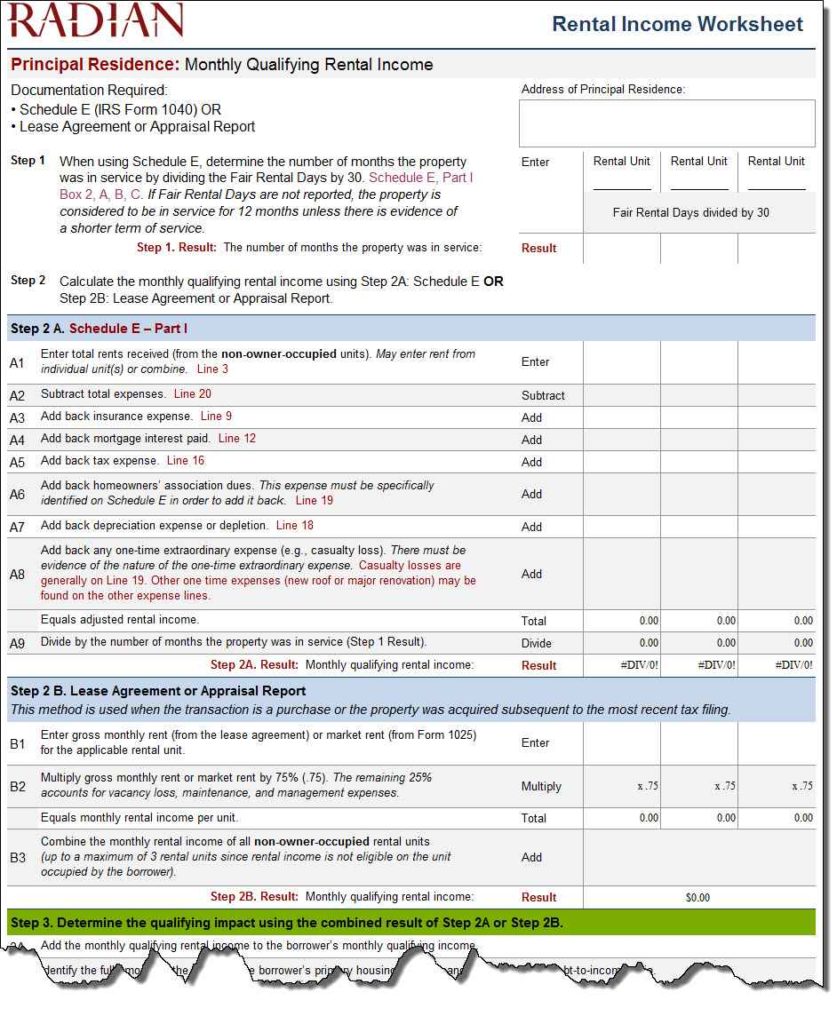 837×1024 mortgage spreadsheet db excelcom from db-excel.com
  1140×969 mortgage payment spreadsheet template excelxocom from excelxo.com
 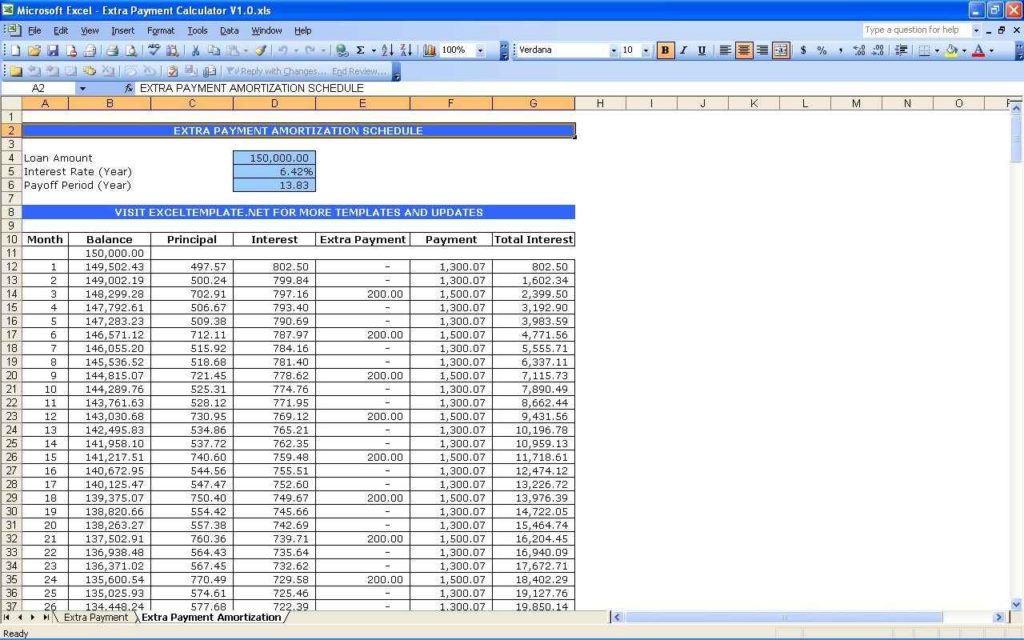 1024×640 loan payment tracking spreadsheet db excelcom from db-excel.com
  2500×1500 payment tracker worksheet mortgage spreadsheet google from www.etsy.com
  1400×1050 mortgage spreadsheet template spreadsheet templates business from excelxo.com
  1024×1321 mortgage spreadsheet extra payments pertaining mortgage from db-excel.com
  794×793 mortgage debt tracker printable mortgage payoff tracker etsy from www.etsy.com
  606×395 mortgage payment calculator from investexcel.net

Mortgage Payment Tracker Spreadsheet :
Mortgage Payment Tracker Spreadsheet was posted in September 9, 2025 at 11:27 pm. If you wanna have it as yours, please click the Pictures and you will go to click right mouse then Save Image As and Click Save and download the Mortgage Payment Tracker Spreadsheet Picture.. Don’t forget to share this picture with others via Facebook, Twitter, Pinterest or other social medias! we do hope you'll get inspired by SampleTemplates123... Thanks again! If you have any DMCA issues on this post, please contact us!
Related For Mortgage Payment Tracker Spreadsheet

Sample Business Plan and Budget Tem
Sample Business Plan and Budget Template Form 10 LetterInteractive Digital Budget Workshee
Interactive Digital Budget Worksheet Interactive Digital Budget Worksheet: TakingDental Care Budget Worksheet
Dental Care Budget Worksheet Creating a Dental Care Budget