Evernote Meeting Agenda
Evernote Meeting Agenda: A Comprehensive Guide
Meetings are a necessary evil in many organizations. But they don’t have to be unproductive time-sinks. A well-structured meeting agenda, easily created and shared using Evernote, can transform your meetings from frustrating wastes of time to efficient, focused, and productive sessions. Let’s explore how Evernote can be leveraged to create effective meeting agendas.
Why Use Evernote for Meeting Agendas?
Evernote offers several advantages for creating and managing meeting agendas:
- Accessibility: Access your agenda from anywhere, on any device. Team members can view and collaborate in real-time.
- Organization: Keep all meeting-related materials – the agenda, supporting documents, notes, and action items – in one easily accessible note.
- Collaboration: Share the agenda with participants and allow them to add their own topics, suggestions, and notes.
- Templates: Leverage Evernote’s template gallery or create your own custom templates for recurring meetings.
- Searchability: Quickly find past meeting agendas and notes using Evernote’s powerful search functionality.
- Integration: Integrate with other tools like Google Calendar or Outlook to link the agenda to the meeting invitation.
- Action Item Tracking: Easily create and track action items within the agenda, ensuring accountability and follow-through.
Creating an Effective Evernote Meeting Agenda
A good meeting agenda provides structure and focus, ensuring that the meeting stays on track and accomplishes its objectives. Here’s a step-by-step guide to creating an effective meeting agenda using Evernote:
1. Define the Meeting’s Purpose and Objectives
Before you start creating the agenda, clearly define the purpose of the meeting. What do you hope to achieve? What decisions need to be made? The objectives should be specific, measurable, achievable, relevant, and time-bound (SMART).
Example: “Review Q3 sales performance and finalize Q4 marketing strategy by October 27th, 2023.”
2. Create a New Evernote Note
Open Evernote and create a new note specifically for the meeting agenda. Give the note a clear and descriptive title, including the date and topic. This will make it easy to find later.
Example: “Team Meeting – Q3 Sales Review & Q4 Marketing Strategy – Oct 27, 2023”
3. Add Key Meeting Information
At the top of the note, include essential information about the meeting:
- Meeting Title: (Repeat from the note title for clarity).
- Date and Time: Ensure everyone knows when the meeting will take place.
- Location: Specify the meeting location (physical or virtual meeting link).
- Attendees: List all attendees. This helps participants prepare and clarifies who is responsible for what.
- Meeting Facilitator: Identify who will be leading the meeting.
- Note Taker: Assign someone to take notes during the meeting.
- Purpose/Objectives: Clearly state the meeting’s purpose and objectives (as defined in step 1).
4. Outline the Agenda Items
This is the core of the agenda. List the topics to be discussed in a logical order. For each item, include:
- Topic Title: A brief and descriptive title for the topic.
- Presenter/Speaker: Identify who will be leading the discussion for that topic.
- Time Allocation: Estimate the amount of time to be spent on each topic. This helps manage the meeting time and ensures that all topics are covered.
- Desired Outcome: Briefly state what you hope to achieve from the discussion of this topic (e.g., decision, agreement, brainstorming).
- Supporting Documents: Link to any relevant documents, presentations, or data that participants should review beforehand. Evernote’s attachment feature is useful here.
Example Agenda Items:
- Q3 Sales Performance Review (Presenter: John Smith, Time: 30 minutes, Outcome: Understand Q3 performance vs. targets, Supporting Docs: Q3 Sales Report.pdf)
- Competitor Analysis Update (Presenter: Jane Doe, Time: 20 minutes, Outcome: Review recent competitor activities, Supporting Docs: Competitor Analysis Presentation.pptx)
- Brainstorming Q4 Marketing Initiatives (Presenter: All, Time: 45 minutes, Outcome: Generate new marketing ideas for Q4)
- Finalize Q4 Marketing Budget (Presenter: David Lee, Time: 15 minutes, Outcome: Approve the Q4 marketing budget, Supporting Docs: Q4 Marketing Budget Proposal.xlsx)
5. Prioritize Agenda Items
Arrange the agenda items in order of importance. Place critical or time-sensitive topics at the beginning to ensure they are addressed even if the meeting runs short. You can use numbering or bullets to clearly indicate the order.
6. Include Time for Q&A and Open Discussion
Allocate time for questions and open discussion at the end of the meeting. This allows participants to clarify any points, raise concerns, and contribute additional ideas.
7. Add Action Items Section
Create a dedicated section in the agenda for recording action items during the meeting. Use checkboxes to easily track progress. Assign each action item to a specific person and include a due date.
Example:
- [ ] John Smith: Prepare a detailed Q4 marketing plan (Due: November 3, 2023)
- [ ] Jane Doe: Research potential new marketing channels (Due: November 10, 2023)
8. Share the Agenda with Attendees
Share the Evernote note with all meeting participants well in advance of the meeting. This allows them to review the agenda, prepare any necessary materials, and add their own topics or suggestions.
9. Use Evernote’s Collaboration Features
Encourage participants to use Evernote’s collaboration features to add comments, ask questions, and share their thoughts directly within the agenda note.
10. During the Meeting
Use the Evernote agenda as a guide to keep the meeting on track. The note taker should record key discussion points and action items directly in the Evernote note.
11. After the Meeting
Distribute the finalized meeting notes (including action items) to all attendees. Follow up on action items and track progress. Evernote’s reminders feature can be used to send reminders about upcoming deadlines.
Evernote Templates for Meeting Agendas
Evernote offers various meeting agenda templates that can be customized to fit your specific needs. You can find these templates in the Evernote template gallery or create your own custom templates for recurring meetings. This saves time and ensures consistency across your meetings.
Conclusion
Using Evernote for meeting agendas can significantly improve the efficiency and productivity of your meetings. By following these steps, you can create well-structured agendas, facilitate effective collaboration, and track action items, ultimately leading to better meeting outcomes.
 700×399 creative meeting agenda template evernote stunning design from legaldbol.com
  800×600 evernote conference evernote design dribbble from dribbble.com
  2560×1466 evernote organize business life from raelyntan.com
 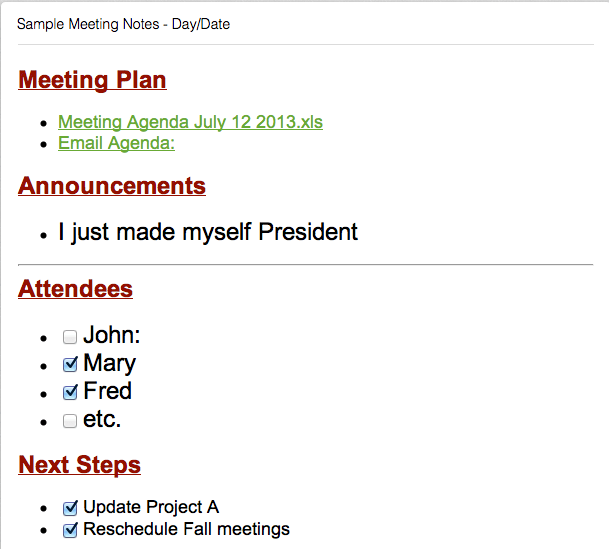 609×549 productivity single powerful feature evernote from www.exkalibur.com



Evernote Meeting Agenda :
Evernote Meeting Agenda was posted in July 25, 2025 at 3:45 pm. If you wanna have it as yours, please click the Pictures and you will go to click right mouse then Save Image As and Click Save and download the Evernote Meeting Agenda Picture.. Don’t forget to share this picture with others via Facebook, Twitter, Pinterest or other social medias! we do hope you'll get inspired by SampleTemplates123... Thanks again! If you have any DMCA issues on this post, please contact us!
Related For Evernote Meeting Agenda
