Meal Prep Budget Spreadsheet
Mastering Meal Prep on a Budget: Your Spreadsheet Guide
Meal prepping is a fantastic way to save time and eat healthier, but it can quickly become an expensive endeavor if not managed correctly. That’s where a budget spreadsheet comes in. A well-designed spreadsheet allows you to plan your meals, track your spending, and optimize your grocery list, ultimately saving you money and reducing food waste. This guide will walk you through creating and using a meal prep budget spreadsheet to take control of your food costs.
Why Use a Meal Prep Budget Spreadsheet?
Before diving into the specifics, let’s outline the benefits of using a spreadsheet:
- Cost Control: See exactly where your money is going and identify areas to cut back.
- Reduced Food Waste: Planning prevents impulse buys and ensures you use ingredients before they expire.
- Improved Diet: Pre-planning encourages healthier choices and portion control.
- Time Savings: Streamline your grocery shopping and meal preparation process.
- Flexibility: Easily adjust your meal plan based on sales, available ingredients, or dietary needs.
Creating Your Meal Prep Budget Spreadsheet
You can use various spreadsheet programs, such as Google Sheets, Microsoft Excel, or Apple Numbers. The principles remain the same regardless of the software you choose.
Key Columns and Information
- Meal Name: (e.g., Chicken and Veggie Stir-Fry, Lentil Soup, Overnight Oats) This allows you to easily identify and track each meal you plan.
- Ingredients: List every ingredient required for the meal. Be specific (e.g., “1 lb Chicken Breast,” not just “Chicken”).
- Quantity: Specify the amount of each ingredient needed for the recipe. Use consistent units (e.g., ounces, grams, cups).
- Unit Price: This is the price per unit of each ingredient (e.g., price per pound of chicken breast). You’ll need to research this at your local grocery store or online. Keep receipts to track pricing effectively. Consider using an average price if prices fluctuate significantly.
- Total Cost: This column calculates the cost of each ingredient for the specific meal (Quantity * Unit Price). Use a formula in your spreadsheet software (e.g., `=B2*C2` where B2 is the Quantity and C2 is the Unit Price).
- Meal Category: (e.g., Breakfast, Lunch, Dinner, Snack). This helps you organize your meals and ensure you have a balanced diet throughout the week.
- Servings: Indicate how many servings each meal provides.
- Cost Per Serving: Calculate the cost per serving by dividing the total meal cost by the number of servings. Use a formula (e.g., `=D2/E2` where D2 is the Total Cost and E2 is the Servings).
- Notes: Add any relevant notes, such as special dietary considerations (e.g., “Gluten-Free,” “Vegan”), preparation tips, or alternative ingredients. You can also note if you already have the ingredient on hand.
Step-by-Step Spreadsheet Setup
- Open your spreadsheet program.
- Create column headers. In the first row, enter the column titles listed above (Meal Name, Ingredients, Quantity, Unit Price, Total Cost, Meal Category, Servings, Cost Per Serving, Notes).
- Enter your meal plan. Start planning your meals for the week (or however long you meal prep for). Fill in the Meal Name and Meal Category columns.
- List ingredients and quantities. For each meal, list all the ingredients and the specific quantities needed.
- Research unit prices. This is the most time-consuming step, but it’s crucial for accurate budgeting. Check your local grocery store flyers, online grocery websites, or your own shopping receipts to find the unit prices of each ingredient.
- Enter unit prices and calculate total costs. Fill in the Unit Price column for each ingredient. Then, use a formula to calculate the Total Cost for each ingredient (Quantity * Unit Price).
- Calculate servings and cost per serving. Enter the number of servings each meal provides. Then, use a formula to calculate the Cost Per Serving (Total Meal Cost / Servings). To calculate the total meal cost, sum the “Total Cost” column for each ingredient in that meal.
- Add notes. Include any relevant notes about the meal, dietary restrictions, or preparation tips. Note any ingredients you already have to avoid unnecessary purchases.
- Create summary sections. Add sections at the bottom of your spreadsheet to calculate totals:
- Total Weekly Meal Prep Cost: Sum the “Total Cost” column for all meals.
- Average Cost Per Meal: Divide the “Total Weekly Meal Prep Cost” by the total number of meals.
- Cost Breakdown by Category: Use formulas or pivot tables to analyze your spending by meal category (Breakfast, Lunch, Dinner, Snack). This helps identify areas where you might be spending more than expected.
Tips for Using Your Meal Prep Budget Spreadsheet Effectively
- Be Accurate: The more accurate your data, the more accurate your budget will be. Take the time to research prices and quantities carefully.
- Update Regularly: Prices can change, so update your unit prices regularly to keep your budget accurate. Ideally, update it each time you shop.
- Track Your Spending: After each shopping trip, compare your actual spending to your budgeted amounts. Identify any discrepancies and adjust your future meal plans accordingly.
- Shop Smart: Use your spreadsheet to create a detailed shopping list. Stick to the list to avoid impulse buys. Look for sales, discounts, and generic brands to save money.
- Embrace Leftovers: Incorporate leftovers into your meal plan to reduce food waste and save money. A “leftover night” can be a budget-friendly option.
- Plan Around Sales: Check your grocery store’s weekly ad before planning your meals. Base your meal plan on ingredients that are on sale to save money.
- Buy in Bulk (When Appropriate): Buying certain staples in bulk (e.g., rice, beans, oats) can be cheaper in the long run, especially if you use them frequently. But consider storage space and shelf life.
- Cook from Scratch: Pre-packaged meals and ingredients are usually more expensive. Cooking from scratch allows you to control the ingredients and portion sizes, saving you money and promoting healthier eating.
- Use Frozen Fruits and Vegetables: Frozen produce is often cheaper and just as nutritious as fresh produce, especially when it’s out of season. They also have a longer shelf life, reducing the risk of food waste.
- Don’t Be Afraid to Adjust: Your meal prep plan is not set in stone. If you find that certain meals are too expensive or time-consuming to prepare, don’t be afraid to adjust your plan. Experiment with different recipes and ingredients to find what works best for you.
- Share with Others: If you live with others, involve them in the meal planning process. This can help reduce food waste and make meal prep more efficient.
Advanced Spreadsheet Techniques
Once you’re comfortable with the basic spreadsheet setup, you can explore more advanced techniques to enhance your budgeting:
- Conditional Formatting: Use conditional formatting to highlight ingredients that are above a certain price point or meals that exceed your target cost per serving.
- Data Validation: Use data validation to create drop-down menus for meal categories, ingredients, or units of measure. This ensures consistency and reduces errors.
- Pivot Tables: Use pivot tables to analyze your spending by meal category, ingredient, or time period. This can help you identify trends and areas for improvement.
- Charts and Graphs: Create charts and graphs to visualize your spending data. This can make it easier to identify areas where you’re overspending.
- Macros: If you’re familiar with programming, you can create macros to automate repetitive tasks, such as updating prices or generating shopping lists.
Example Meal Prep Budget Spreadsheet (Simplified)
| Meal Name | Ingredients | Quantity | Unit Price | Total Cost | Meal Category | Servings | Cost Per Serving | Notes |
|---|---|---|---|---|---|---|---|---|
| Overnight Oats | Rolled Oats | 1 cup | $0.10/cup | $0.10 | Breakfast | 1 | $0.10 | Add berries for extra nutrients |
| Overnight Oats | Almond Milk | 1 cup | $0.50/cup | $0.50 | Breakfast | 1 | $0.50 | Can substitute with regular milk |
| Overnight Oats | Chia Seeds | 1 tbsp | $0.25/tbsp | $0.25 | Breakfast | 1 | $0.25 | Adds fiber and healthy fats |
| Total Cost of Overnight Oats: | $0.85 | Breakfast | 1 | $0.85 | ||||
| Chicken and Veggie Stir-Fry | Chicken Breast | 1 lb | $3.00/lb | $3.00 | Dinner | 4 | $0.75 | Can use tofu for vegetarian option |
| Chicken and Veggie Stir-Fry | Broccoli | 1 head | $2.00/head | $2.00 | Dinner | 4 | $0.50 | |
| Chicken and Veggie Stir-Fry | Bell Peppers | 2 | $1.00/each | $2.00 | Dinner | 4 | $0.50 | |
| Chicken and Veggie Stir-Fry | Soy Sauce | 2 tbsp | $0.05/tbsp | $0.10 | Dinner | 4 | $0.03 | Low sodium |
| Total Cost of Chicken Stir-Fry: | $7.10 | Dinner | 4 | $1.78 | ||||
Total Weekly Meal Prep Cost: (This would be a sum of all total costs across all meals for the week).
Average Cost Per Meal: (Total Weekly Meal Prep Cost / Number of Meals).
Conclusion
A meal prep budget spreadsheet is a powerful tool for taking control of your food costs, reducing food waste, and improving your diet. By creating and using a spreadsheet, you can plan your meals effectively, track your spending accurately, and make informed decisions about your grocery shopping. With a little effort and consistency, you can master meal prepping on a budget and enjoy the many benefits it offers.
 927×1200 meal prep meal plan volume budget bytes from shop.budgetbytes.com
  800×533 budget meal prep sweet pea chef from www.asweetpeachef.com
  500×500 budget meal prep summary mindy mom from www.seemindymom.com
 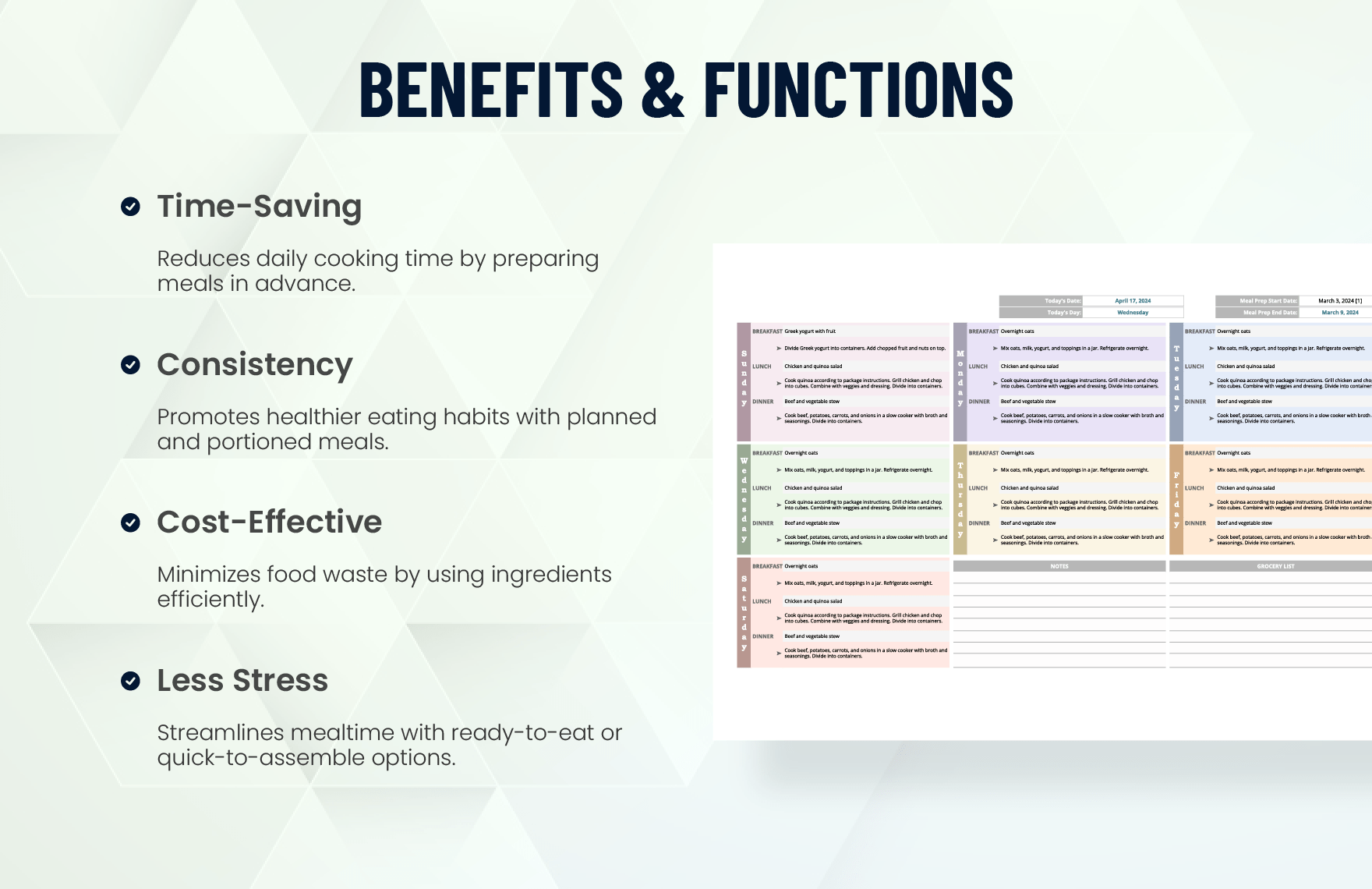 1760×1140 meal prep template excel google sheets templatenet from www.template.net
  683×1024 meal prep budget from www.collegenutritionist.com
  791×1024 meal prep planning sheet practical default from practicalbydefault.com
  753×1024 meal prep mother damn good mom from damngoodmom.com
  2000×2000 meal planner spreadsheet monthly meal prep template family meal from www.etsy.com
  600×600 monthly budget spreadsheet cents purpose from centsandpurpose.com
  1080×1080 meal prep sheet meal prep avoid stress save money etsy from www.etsy.com
  794×1028 meal plan prep sheet printable etsy from www.etsy.com
  1700×2200 printable meal prep template printable templates from printablebylena.com
  1760×1140 budget friendly meal plan template templatenet from www.template.net
  1300×1950 budget meal planning tips work printable from mommyoverwork.com
  354×499 printable monthly meal plan budgetworksheetsnet from budgetworksheets.net
  1024×778 restaurant budget spreadsheet google spreadshee from db-excel.com
  2100×3300 meal budget planner create meal budget planner from www.pinterest.pt
  735×735 beginners guide meal planning budget printables from www.fundingcloudnine.com
  800×641 yearly budget spreadsheet version coplentycom from coplenty.com
  1080×810 grocery budget worksheet meal planner breakdown digital instant from www.etsy.com
  700×1000 meal plan budget template from templates.rjuuc.edu.np
  1080×1080 printable meal plan budget worksheet meal planner budget insert from www.etsy.com
  1140×912 monthly budget template meal planner budget planner budget etsy from www.etsy.com
  1200×867 super guide budget meal planning broke london from www.brokeinlondon.com
  1140×1130 printable meal plan budget worksheet meal planner etsy from www.etsy.com
  1200×1800 weekly budget meal plan savvy bites from savvybites.co.uk
  1200×1800 family budget meal plan savvy bites from savvybites.co.uk
  1200×1800 family budget meal planning savvy bites from savvybites.co.uk
  1200×1800 budget family meal plan savvy bites from savvybites.co.uk
  768×768 printables meal planning budget lets learn from letsliveandlearn.com
  768×1152 family budget meal planner savvy bites from savvybites.co.uk


Meal Prep Budget Spreadsheet :
Meal Prep Budget Spreadsheet was posted in August 11, 2025 at 5:02 am. If you wanna have it as yours, please click the Pictures and you will go to click right mouse then Save Image As and Click Save and download the Meal Prep Budget Spreadsheet Picture.. Don’t forget to share this picture with others via Facebook, Twitter, Pinterest or other social medias! we do hope you'll get inspired by SampleTemplates123... Thanks again! If you have any DMCA issues on this post, please contact us!
Related For Meal Prep Budget Spreadsheet

Project Budget Template Free
Project Budget Template Free Simple Limited Power of Attorney
Financial Forecasting and Planning
Financial Forecasting and Planning for Business Letter of Intent
Budget Planner PDF
Budget Planner PDF Baby Shower Invitation DownloadHospitality Management ResumeDisney