Internal Update Agenda Sheet
Internal Update Agenda Sheet: A Comprehensive Guide
An internal update agenda sheet is a critical tool for structuring and maximizing the effectiveness of internal meetings. It serves as a roadmap, ensuring that all participants are aligned on the meeting’s objectives, understand the flow of discussion, and are prepared to contribute meaningfully. Without a well-defined agenda, meetings can quickly devolve into unproductive time-wasters, characterized by rambling discussions, lack of focus, and missed opportunities for collaboration and decision-making.
Why Use an Internal Update Agenda Sheet?
The benefits of using a structured agenda sheet are numerous:
- Increased Efficiency: A pre-circulated agenda allows attendees to prepare relevant information and focus their attention on the key topics. This reduces time spent getting everyone on the same page and allows for more efficient discussions.
- Improved Focus: The agenda acts as a guide, preventing the conversation from drifting off-topic and ensuring that the meeting stays focused on its intended objectives.
- Enhanced Participation: Knowing the agenda in advance empowers participants to think about the topics, gather data, and formulate their contributions. This leads to more informed and engaged discussions.
- Better Decision-Making: A structured agenda facilitates a logical flow of information, allowing for a more thorough examination of issues and ultimately leading to better-informed decisions.
- Accountability and Follow-Up: The agenda can include assigned owners for specific action items, ensuring that tasks are delegated and followed up on after the meeting.
- Reduced Meeting Time: By streamlining discussions and keeping them on track, a well-crafted agenda can significantly reduce the overall length of the meeting.
Key Components of an Effective Internal Update Agenda Sheet
A robust internal update agenda sheet should include the following elements:
- Meeting Title: A clear and concise title that accurately reflects the purpose of the meeting (e.g., “Project X Status Update,” “Marketing Team Weekly Sync,” “Sales Performance Review”).
- Date and Time: Clearly state the date and time the meeting is scheduled to begin and end. Consider time zone differences if attendees are in different locations.
- Location (or Platform): Specify the physical location of the meeting or the online platform being used (e.g., Conference Room A, Zoom Meeting ID: 123456789).
- Attendees: List all attendees, including their names and roles. This helps participants understand who else will be contributing to the discussion.
- Objectives: Clearly state the specific goals and desired outcomes of the meeting. What do you hope to achieve by the end of the session? (e.g., “Review project milestones and identify any roadblocks,” “Discuss marketing campaign performance for Q3,” “Finalize the budget for the next quarter”).
- Agenda Items: This is the core of the agenda sheet. Each item should be listed with a brief description of the topic to be discussed. Use clear and concise language.
- Time Allocation: Assign a specific time allotment to each agenda item. This helps to keep the meeting on schedule and prevents any single topic from dominating the conversation.
- Presenter/Owner: Designate the person responsible for leading the discussion on each agenda item. This ensures accountability and clarity.
- Desired Outcome for Each Item: For each agenda item, specify the desired outcome. What specific actions, decisions, or information are you aiming to achieve during the discussion? (e.g., “Approve the proposed marketing budget,” “Identify the root cause of the project delay,” “Brainstorm solutions to improve customer satisfaction”).
- Pre-Reading Material (Optional): If attendees need to review specific documents or data before the meeting, include links or attachments in the agenda. This allows them to come prepared and contribute more effectively.
- Action Items: This section is typically completed during the meeting and includes a list of tasks to be done after the meeting, along with assigned owners and deadlines. This ensures that decisions are implemented and follow-up is handled effectively.
- Parking Lot: A “parking lot” is a section for capturing topics that are raised during the meeting but are not directly relevant to the agenda. These topics can be addressed in a future meeting or individually. This prevents the meeting from getting derailed while still acknowledging important issues.
Tips for Creating an Effective Agenda Sheet
To create an agenda sheet that truly enhances the effectiveness of your meetings, consider the following tips:
- Keep it Concise: Avoid overly detailed descriptions. Focus on the core issues and desired outcomes.
- Prioritize Items: List the most important items at the beginning of the agenda to ensure they receive adequate attention.
- Be Realistic with Time Allocations: Estimate the time required for each item accurately. It’s better to underestimate and adjust during the meeting than to be overly optimistic.
- Distribute the Agenda in Advance: Send the agenda to attendees at least 24 hours before the meeting (ideally 48 hours) to give them ample time to prepare.
- Solicit Input: Encourage attendees to suggest agenda items or provide feedback on the proposed agenda. This fosters a sense of ownership and ensures that all relevant issues are addressed.
- Follow the Agenda: As the meeting facilitator, it’s your responsibility to keep the discussion on track and ensure that the agenda is followed.
- Take Minutes: Designate someone to take meeting minutes, capturing key decisions, action items, and follow-up tasks.
- Review and Improve: After each meeting, review the agenda and identify areas for improvement. What worked well? What could be done differently next time?
Example of an Internal Update Agenda Sheet
Meeting Title: Project Phoenix Weekly Status Update
Date: October 26, 2023
Time: 10:00 AM – 11:00 AM PST
Location: Zoom Meeting (Link: [Zoom Link])
Attendees: John Doe (Project Manager), Jane Smith (Lead Developer), Peter Jones (QA Tester), Mary Williams (Marketing Lead)
Objectives: Review project progress, identify any roadblocks, and assign action items for the week.
| Item | Description | Time | Presenter | Desired Outcome |
|---|---|---|---|---|
| 1. Project Status Overview | Brief overview of progress against key milestones. | 15 minutes | John Doe | Identify completed tasks and any deviations from the schedule. |
| 2. Development Update | Review of completed development tasks, upcoming sprints, and potential challenges. | 20 minutes | Jane Smith | Discuss any coding issues or resource constraints. |
| 3. QA Testing Results | Presentation of QA testing results, bug reports, and remediation plans. | 15 minutes | Peter Jones | Prioritize bug fixes and assign tasks for remediation. |
| 4. Marketing Update | Review of marketing campaign performance and upcoming initiatives. | 10 minutes | Mary Williams | Align marketing efforts with project milestones. |
| 5. Open Discussion/Q&A | Open forum for questions, concerns, and additional discussion. | 10 minutes | All | Address any outstanding issues and ensure alignment. |
Action Items: (To be completed during the meeting)
Parking Lot: (To be completed during the meeting)
Conclusion
A well-structured internal update agenda sheet is an indispensable tool for ensuring that meetings are productive, focused, and result-oriented. By incorporating the elements discussed above and adapting the agenda to the specific needs of your team and organization, you can significantly improve the effectiveness of your internal communication and drive better outcomes.
 1882×960 recurring alertsupdate requests entire sheet smartsheet from community.smartsheet.com
 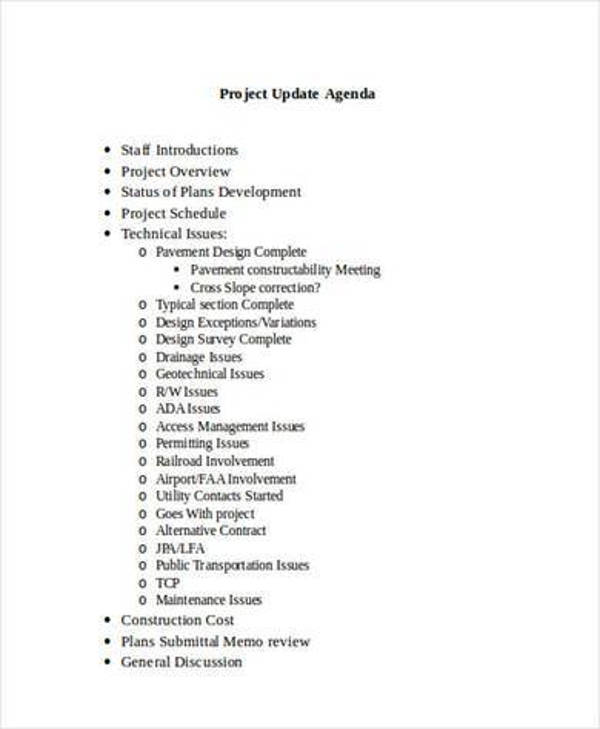 600×729 project agenda samples templates ms word from www.sampletemplates.com
 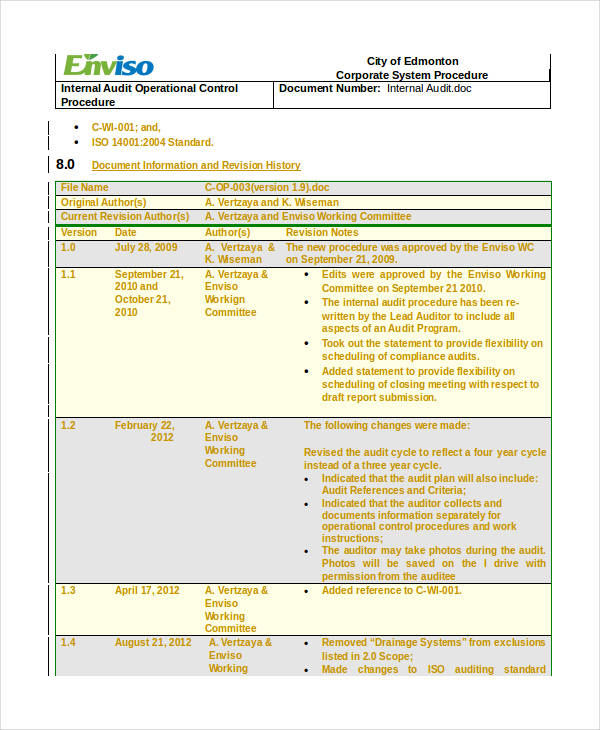 600×730 agenda examples format sample examples from www.examples.com
  1000×625 task update template from lesboucans.com



Internal Update Agenda Sheet :
Internal Update Agenda Sheet was posted in July 31, 2025 at 2:24 am. If you wanna have it as yours, please click the Pictures and you will go to click right mouse then Save Image As and Click Save and download the Internal Update Agenda Sheet Picture.. Don’t forget to share this picture with others via Facebook, Twitter, Pinterest or other social medias! we do hope you'll get inspired by SampleTemplates123... Thanks again! If you have any DMCA issues on this post, please contact us!